4
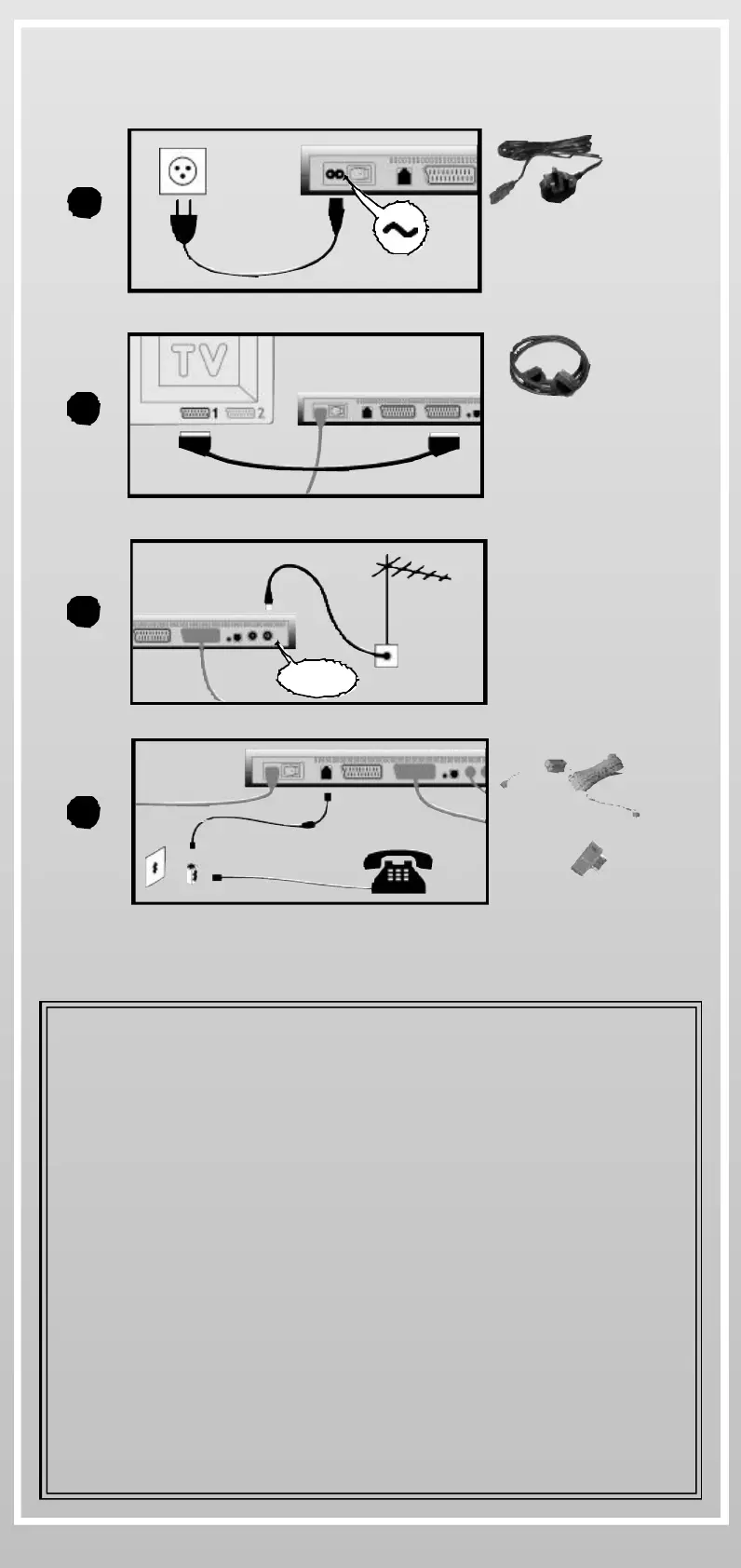
INSTALL iPLAYER
Connect the power cable to the main supply
Connect the SCART lead to your television
Connect your aerial lead to the antenna connector
Connect the phone cable + adaptor to your phone line
You can now switch iPlayer on.
220-240 V AC
50-60Hz
ANTENNA
1
2
3
4
EXTEND YOUR WARRANTY TO UP TO 3 YEARS
BY CONNECTING THE TELEPHONE
By keeping iPlayer connected to the telephone line (even if you don’t
use interactive services), you benefit from a free software
maintenance service. Effectively, approximately once a month,
iPlayer will automatically place a call at night and check for software
corrections and enhancements.
THIS SERVICE IS ABSOLUTELY FREE,
THE TELEPHONE CALL IS A TOLL-FREE NUMBER
If a new software update is available, you will be informed on the TV
screen, and you can then decide to perform the upgrade when you
choose to do so. Software upgrade is free, with the exception of
connection time, charged at your Internet service rate.
Because software updates increase the life time of iPlayer, you
benefit from a free automatic warranty extension. After the standard
one-year warranty, the warranty is extended month to month by
keeping your iPlayer connected to your telephone line.


 To Next Page