7
netis 4CH Wireless IP Camera & NVR Security Kit Quick Installation Guide
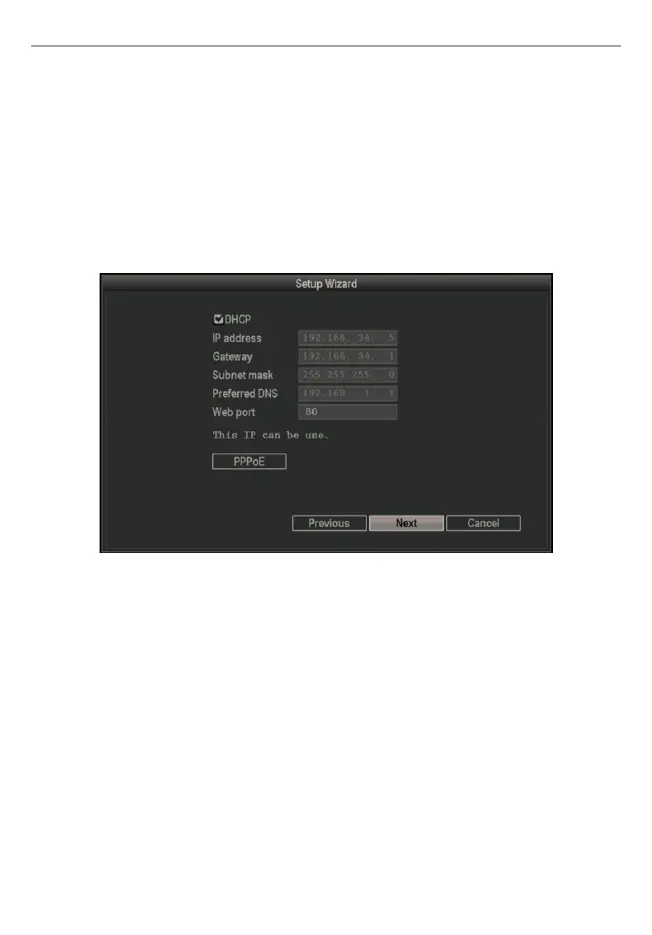
Step 6: Internet connection. In default the connection type is DHCP, you can manually
select the type and fill in the needed network parameters from your ISP. Left-click on
“Next”, then the system will search IP camera automatically.
Note: The wireless NVR support three Internet connection types.
DHCP: The wireless NVR will automatically receive the IP parameters from your ISP.
Static IP: Please enter the IP address, default gateway, subnet mask, preferred DNS
Servers given by your ISP.
PPPoE: Please enter the username and password given by your ISP.


 To Next Page