netis 4CH Wireless IP Camera & NVR Security Kit Quick Installation Guide
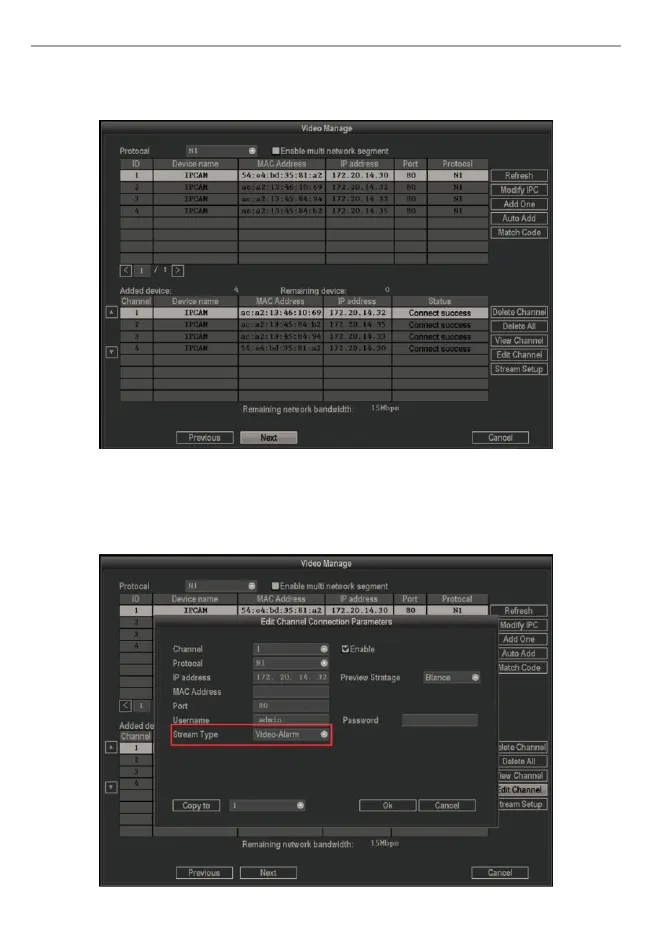
Step 7: Video manage, here you can edit channel, set stream, match code and so on.
Left-click on “Next”.
Note: If you want to enable the buzzer alarm function. Please click on “Edit Channel”,
and select stream type “Video-Alarm”. Now the function is enabled. Then go to “Main
Menu” -> “System Setup”->“Video Detection” to check “Buzzer”, also you can check
“E-mail Notice”, and go back to “System Setup” -> “Network Setup” to set the E-Mail.
8


 To Next Page