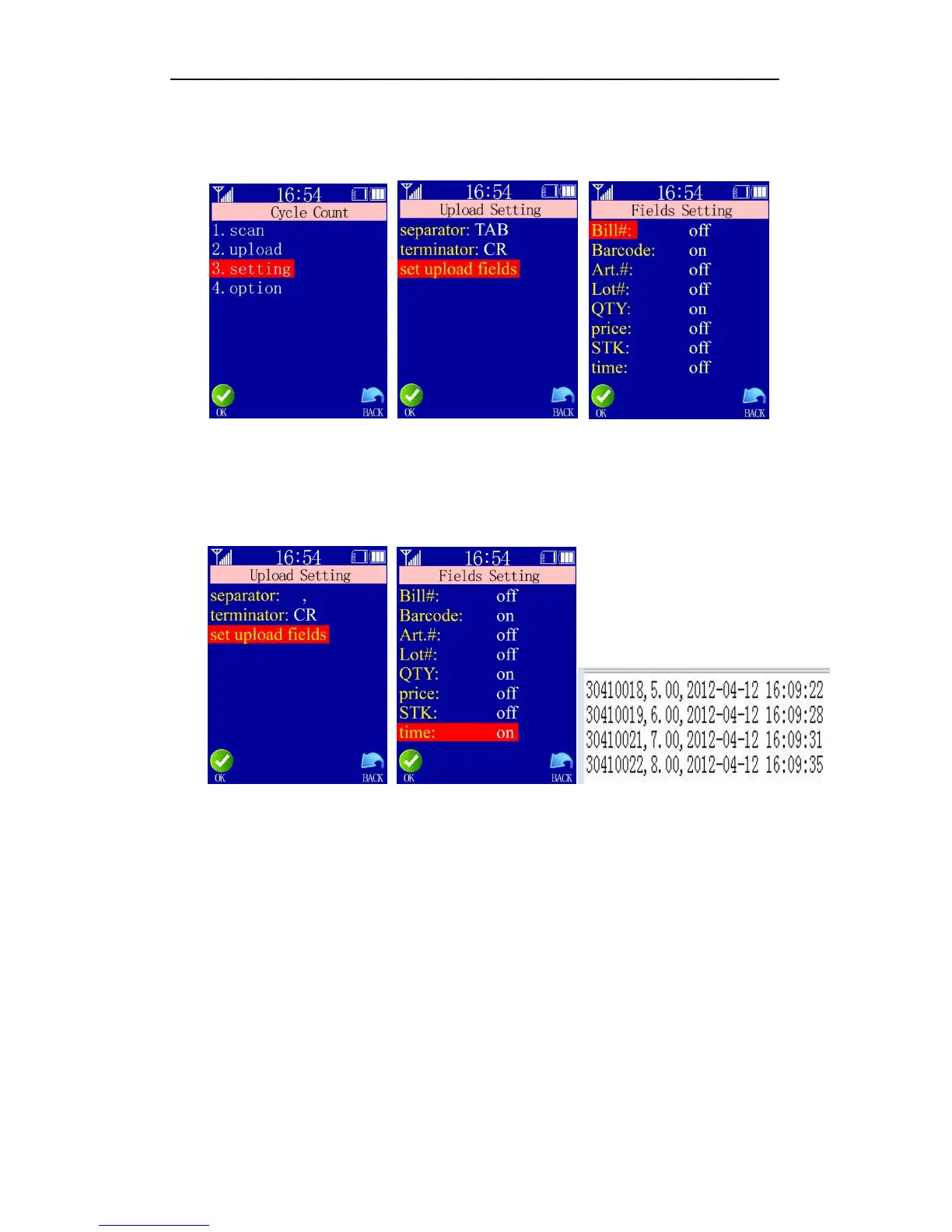
Transmission Setting: define the separator and/or terminator of the transmission data
(none, space, tab, CR, LF, comma and semicolon available) and specify
fields to be uploaded.
Note: use up or down arrow key to move among options and OK to confirm selection.
Then use left or right arrow keys to change status and OK to confirm.
eg. The separator is set to be comma and the terminator “CR”, and fields to be
uploaded are barcode, quantity and time, then it should look like this in a txt file:
Note: upload setting and fields setting are valid only in wireless transmission to
computer txt or excel file.
Advanced Functions:
1) Bill No.: when it is enabled, multiple bills, warehouse, shops management is
supported;
2) LOT #: when it is enabled, multiple lot number management is supported. It is very
useful in the pharmaceutical industry. When the barcode is read, press the left or
right arrow key to select the corresponding lot number:
3) Edit Lot: when it is enabled, the user may change the error lot number manually;
4) Edit price: when it is enabled, the user can change manually the default price to the
actual price at the time of sale;
5) Unicity: it is usually applied to manage serial number. When it is enabled, a
notification will come ask the user if it is allowed to process repeat barcode;


 To Next Page