Got Questions? Let Us Help! Email
SUPPORT@NEUMITECH.COM
PLAYING VIDEOS
Ratio
Choose between stretched full screen or original aspect ratio
Sequence
Set the video playback repeat mode for one or all videos in the folder
Audio
Select which audio track to play
Subtitle
Select the subtitle track to display
Encoding
Select the subtitle text encoding
Size
Select the subtitle text size
Color
Select the subtitle text color
Note: Subtitle text encoding uses the UTF-8 code page by default. Due to the many ways in which text
can be encoded, the only officially supported subtitle languages are English, Spanish, and Chinese even
though other languages may be supported by the available encoding settings.
DISPLAYING SUBTITLES
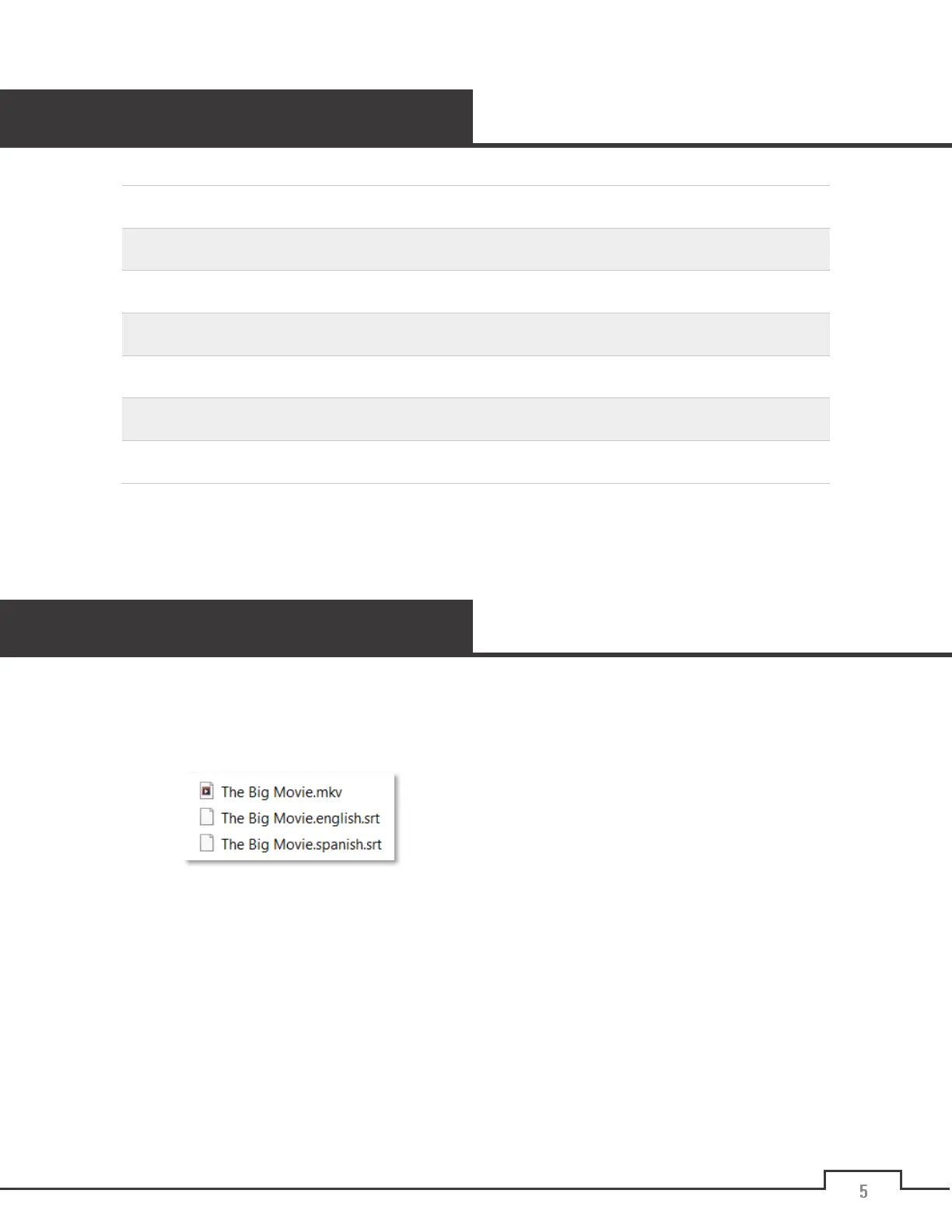
The NEUMI ATOM 4K supports internal and external subtitles, including SRT, SUB+IDX, and PGS formats. If
both internal and external subtitles are detected, they are listed together. To use an external subtitle file,
name it the same as the video, but with a language and “SRT” file extension, and place it in the same folder
as the video. For example:
To display subtitles, make sure Subtitle Display is turned on in the settings menu. Then, while playing the
video, press the
Menu
button on the remote control to bring up the playback menu, select the subtitle track
you want to display, and press the
OK
button to confirm.


 To Next Page