Got Questions? Let Us Help! Email
SUPPORT@NEUMITECH.COM
PLAYING PHOTOS
From the main menu, select the
Photos
icon, then select the USB drive or Micro SD Card to browse for
photos to play. Find the photo you would like to play, press the
OK
button on the remote and it will be
displayed. The media player recognizes up to 1000 photos in a folder and can play a slideshow of photos
within the same folder. The media player can also be configured to automatically start playing photos in a
slideshow whenever it is turned on – please refer to the settings section for instructions.
During photo playback, you can...
• Pause or resume photo slideshow using the
OK
button. Press the
Return
button to stop.
• Use the
Left/Right
buttons on the remote to go to the previous or next photo.
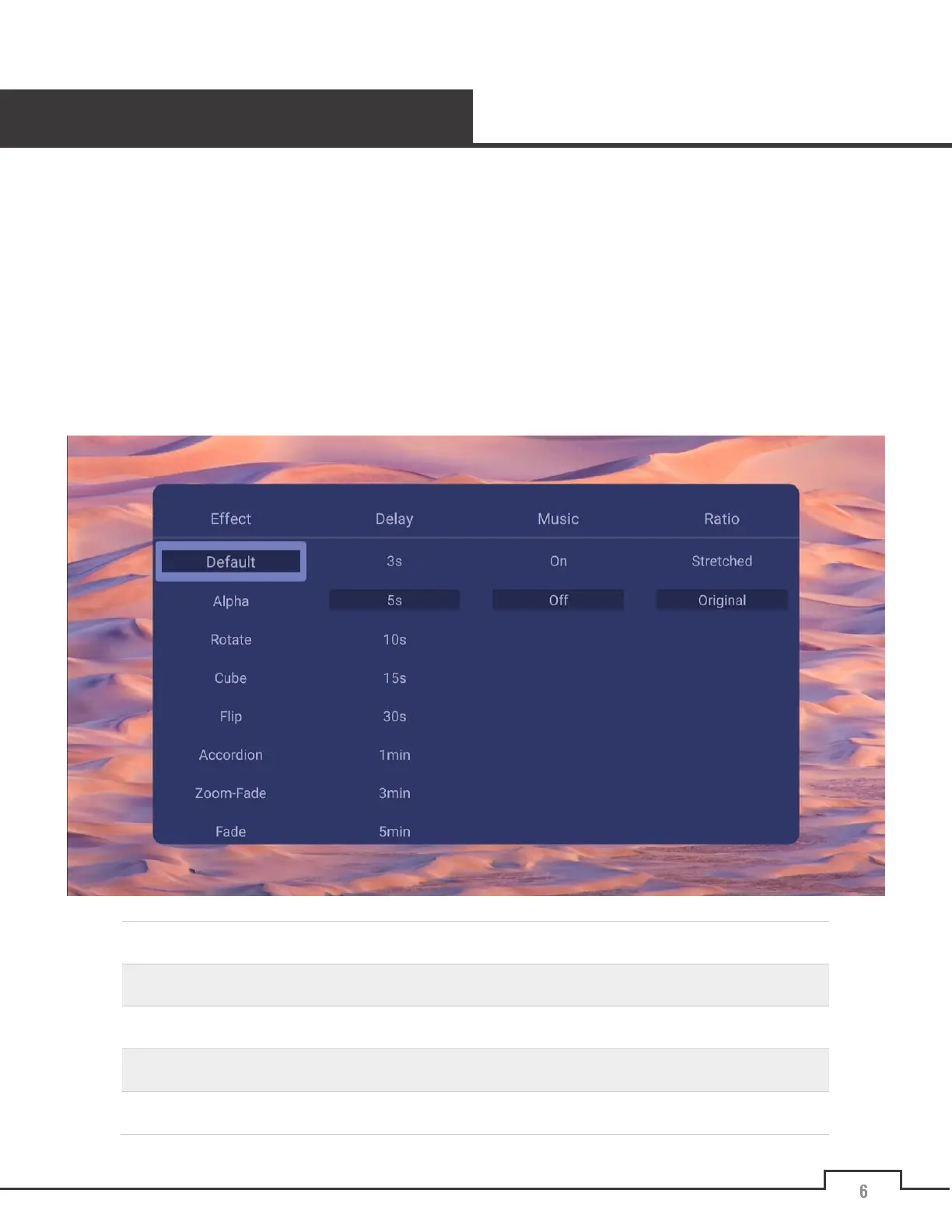
• Additional photo display options are available by pressing the
Menu
button:
Effect
Sets the slideshow transition effect
Delay
Set the delay time between photos in a slideshow
Music
Play background music from the same folder as the photos
Ratio
Choose between stretched full screen or original aspect ratio
Sequence
Choose between sequential or random photo slideshow


 To Next Page