11
NEURAL DSP // ARCHETYPE PLINI
NEURALDSP.COM
GETTING STARTED
TIME EFFECTS SECTION
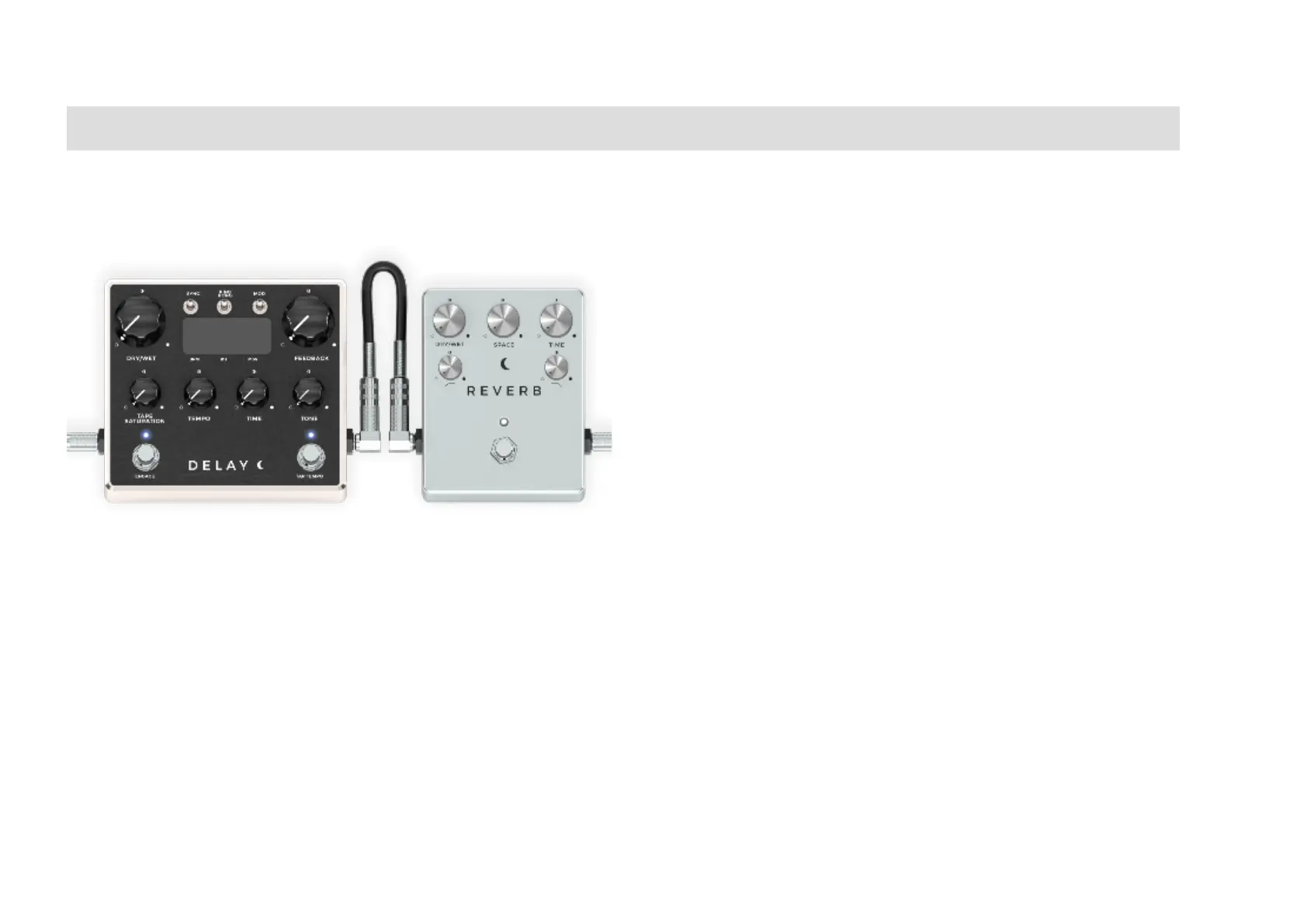
DELAY PEDAL
DRYWET KNOB: Controls the amount of effect that is
added to the original dry input signal.
FEEDBACK KNOB: Sets the amount of delay returned to
the input of the delay line. The higher the setting the more
repeats.
TAPE SATURATION KNOB: This knob drives the signal to
create a subtle tape saturation effect.
TEMPO KNOB: Adjust the BPM (Beats Per Minute).
TIME KNOB: Sets the delay time in subdivisions. From 1/64T
to 1/1D.
TONE KNOB: Controls the frequency range of the low pass
filter.
SYNC SWITCH: Determines whether delay time is set
according to DAW tempo or manually.
PING PONG SWITCH: Turn on/off the ping pong delay
effect (Stereo, Mono to Stereo configurations only).
MOD SWITCH: Adds pitch modulation to the delay repeats.
STOMP ENGAGE SWITCH: Press to activate. This will turn
on the Delay and let it process your signal.
STOMP TAP TEMPO SWITCH: Controls the delay time by
clicking. Delay Time is set as the interval between the last
two clicks on the pad.
SCREEN: Displaying time and subdivision values.
REVERB PEDAL
DRYWET KNOB: Controls the amount of effect that is
added to the original dry input signal.
SPACE KNOB: Controls the Stereo Image of the Reverb.
TIME KNOB: Sets the duration of the reverb decay envelope.
HP FILTER KNOB: Controls the frequency range of the
high pass filter.
LP FILTER KNOB: Controls the frequency range of the low
pass filter.
STOMP BYPASS SWITCH: Press to activate. This will turn
on the Reverb and let it process your signal.


 To Next Page