EasyManua.ls Logo

New Holland AUTO COMMAND T7OOO - Page 8

New Holland AUTO COMMAND T7OOO
24 pages
Print Icon
To Next Page IconTo Next Page
To Previous Page IconTo Previous Page
Loading...
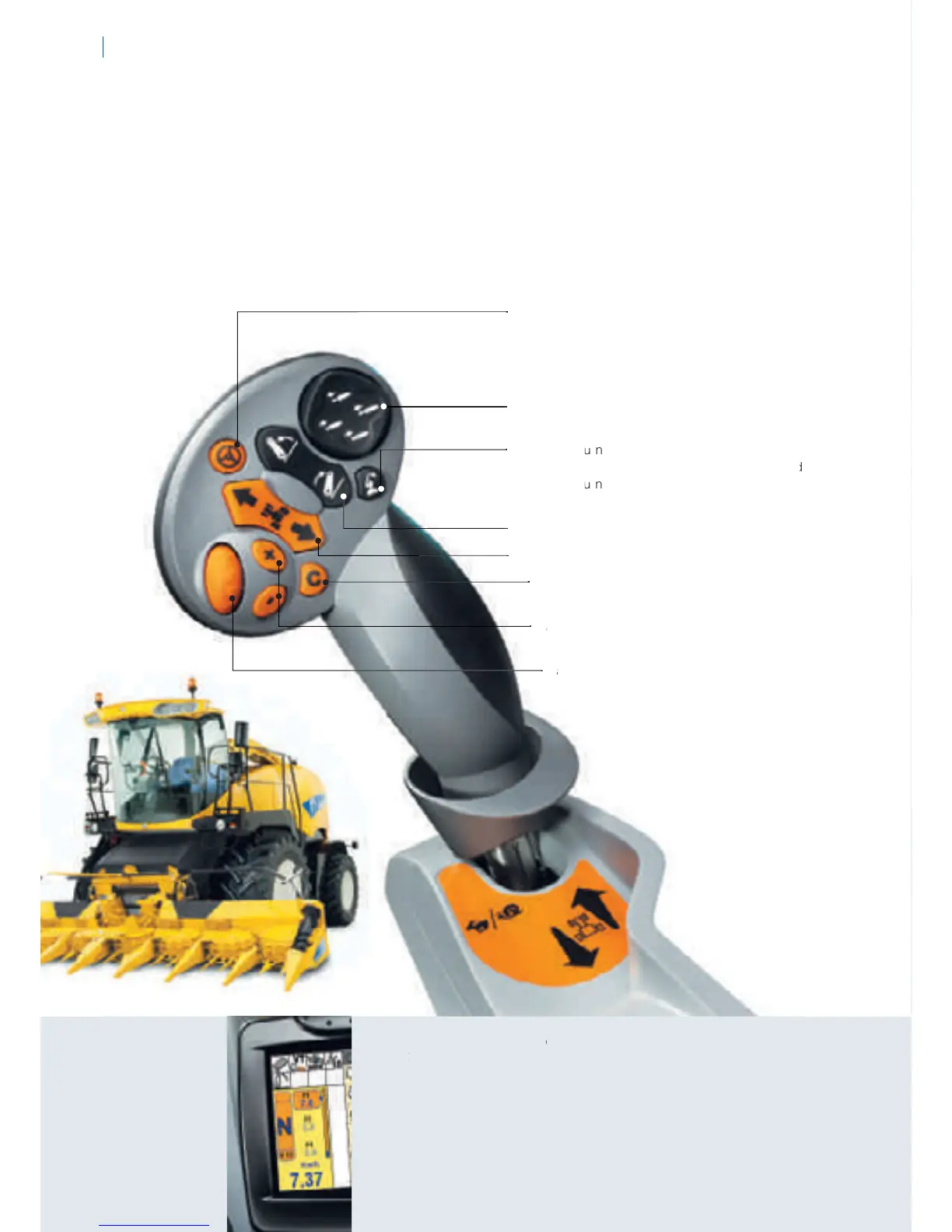
Activate IntelliSteer™ system push button to
Activate
IntelliSteer
system
push
button
to
e
n
g
a
g
e automatic
g
uidance system. A choice
of
co
r
r
ect
i
ona
l
s
ig
na
l
s
i
s ava
il
a
bl
e.
Wi
t
h
an
R
T
K
s
i
g
nal, the tractor will steer itsel
f
with a pass to
p
ass accuracy o
f
between 1 cm to 2 cm.
• Electr
o
hyd
rau
li
c r
e
m
o
t
e con
tr
o
l
s –
f
ingert
i
p contr
o
l o
f
two r
e
mote va
l
ves
.
• Headland T
u
T
T
r
n
S
equence and en
g
ine spee
d
m
anagemen
t
con
tr
ol
.
A
ct
i
vates t
h
e pr
e
-
r
ecor
d
d
e
d
Headland T
u
T
T
r
n
Se
q
uence or alte
r
thenativel
y
allows
s
.
o
perator to switch between two set en
g
ine speed
s
• Rear linkage raise and lower
.
• Powershuttle switch – Finger
ti
p
di
r
e.
ect
i
on c
h
ang
e
• Cruise contr
io
n
ol – Auto
C
ommand™ transmiss
wor
k
s automat
i
ca
ll
y to opt
i
m
i
se pe
r
f
or
e.
mance
• T
a
T
T
rget spee
d
se
l
ect
i
on – a
ll
ows you
t
o c
h
ange
b
etween t
hr
ee target spee
d
s
.
• T
a
T
T
e
e
d
r
g
et spee
d
a
dj
ustment – set a tar
g
et sp
e
e
,to matc
h
your exact nee
d
s.
A
s an examp
le
it is useful when movin
g
betwee
n
d
i
f
f
er
e
n
t
fi
e
l
ds
o
r wh
er
e
c
ro
p
y
ields have alte
r
ed.
CONTINUOUSLY VARIABLE TRANSMISSION
FOR BEST PRODUCTIVITY AND FUEL SAVINGS
The CommandGri
p
™ handle
pr
o
vides access to all ma
j
or contr
o
l
s
. I
t
s
h
ar
es
t
h
e
same er
g
onom
i
c
d
es
ig
n as t
h
e p
r
oven CommandGri
p
™ handle used in New Hollan
d
FR
f
orage harvesters. A key advantage o
f
the design is that it enables a range o
f
tas
k
s to
b
e comp
l
ete
d
toget
h
e
r
.
Thi
s can
i
nc
l
u
d
e a
dj
ust
i
ng t
h
e tractor
s
spee
d,
ra
i
s
i
ng t
h
e
li
n
k
age, operat
i
ng t
h
e
r
e
m
ote valves or activating automated
f
unctions.
AUTO COMMAND™ TRANSMISSION89
INTELLIVIEW III

S
H
O
W
S
Y
O
YY
U
A
LL
Y
O
Y
Y
R
S
PEED
S
ETTIN
GS
In
te
llivi
e
w III will
s
h
o
w
t
h
e
d
i
r
ect
i
o
n
of
travel
,
th
r
e
e set tar
g
et speeds and
se
l
ecte
d
d
r
i
v
i
n
g
mo
d
e.
All
r
ele
v
a
n
t
in
for
m
at
i
on
i
s easy to see at a g
l
ance
.

Related product manuals