11
Click icon and access Google Play to download and install favorite apps.
Click Setting and users can access to system setting. For more detail, please also see
System Setting chapter.
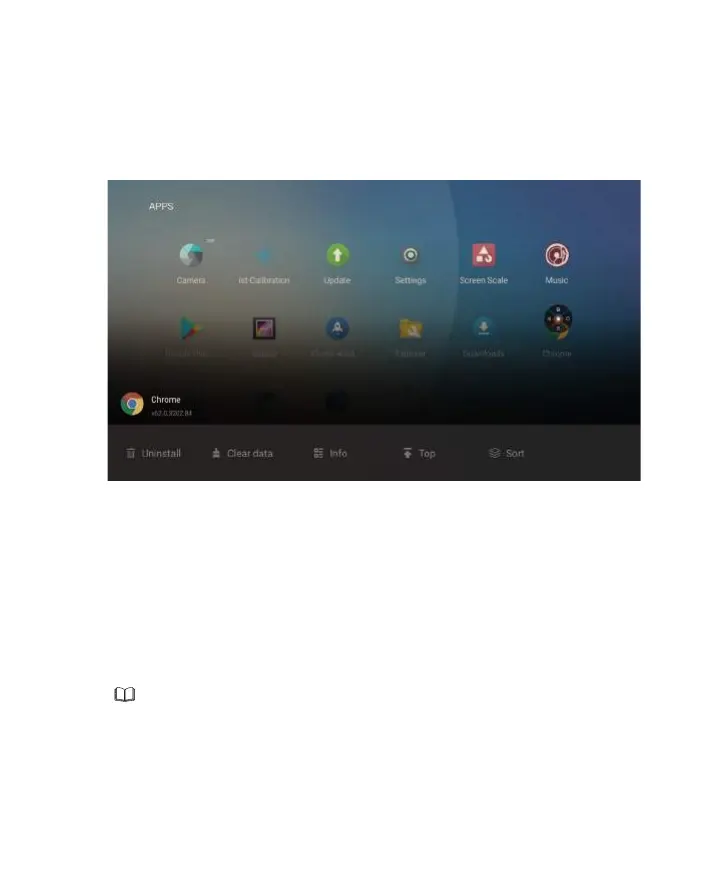
Click All Apps icon and the application list will be shown. The application list contains default
apps and the apps users installed.
Click the icon to activate the app or press and hold for other menu including Uninstall, Clear
data, Info, Top and Sort.
◆
Application list
◆
Google Play
◆
Setting
●
Uninstall: Uninstall the application.
●
Clear data: Clear historic data of applications.
●
Info: View information related to applications.
●
Top: Place the application icons to the top of the page.
●
Sort:
Users may sort the applications by alphabetical order, installed time or usage frequency.
It requires Google account to download apps from Google Play.
Note


 To Next Page