Need help?
Do you have a question about the Newskill ICARUS Series and is the answer not in the manual?
Critical warnings regarding power supply, grounding, and electrical safety for the monitor.
Explains the function of each button on the monitor for navigation and control.
Details the various input and output ports available on the monitor for connectivity.
Steps to connect the monitor to a power source safely and correctly.
How to connect headphones for audio output from the monitor.
Instructions for connecting the monitor via an HDMI cable.
Instructions for connecting the monitor via a DisplayPort cable.
 General
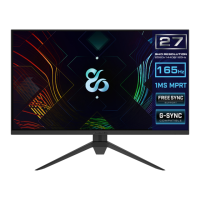
| Panel Type | IPS |
|---|---|
| Resolution | 2560x1440 (QHD) |
| Aspect Ratio | 16:9 |
| Refresh Rate | 165Hz |
| Response Time | 1ms (MPRT) |
| Adaptive Sync | AMD FreeSync Premium |
| Brightness | 350 cd/m² |
| Contrast Ratio | 1000:1 |
| VESA Mount | 100x100mm |
| Screen Size | 27 inch |
| Connectivity | HDMI 2.0 |
| Viewing Angle | 178°/178° |
| Color Gamut | 99% sRGB |

 To Next Page