7
ICARUS SERIES
EN
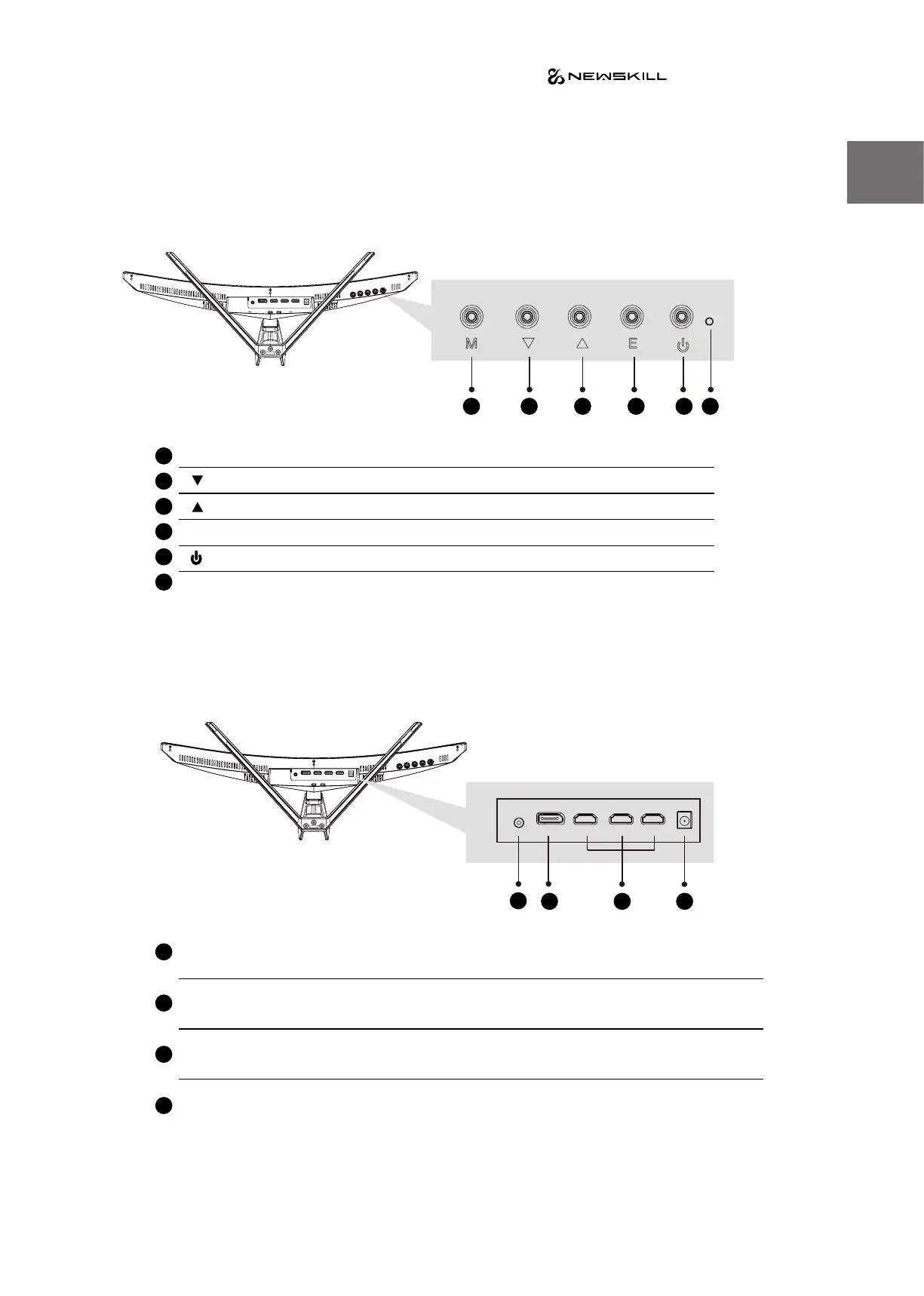
2. Product Overview
2.1 Monitor Buttons
2.2 Monintor Ports
Connect the signal line to output interfaces signal of DP/HDMI signals of PC, and then connect the other end of
the signal line to the corresponding signal input port of the display.
M Menu Buon Press to display the OSD menu or enter sub-menus.
Down Buon Press to move down in the menus.
Up Buon Press to move up in the menus.
Exit Buon Press to exit.
Power Buon Press to turn the monitor on/o.
LED Indicator Changes colors to indicate status.
Audio Output
Insert one end of the Audio cable into the computer’s Audio output to
recevie the Audio signals from your monitor.
DP Connectors
Insert one end of the DP cable into the computer’s DP output and connect
the other end to the monitor’s DP port.
HDMI Connectors
Insert one end of the HDMI cable into the computer’s HDMI output and
connect the other end to the monitor’s HDMI port.
Power Connector Insert the power cable to supply power to the monitor.
8 9
10
1
8
7
7
3
5
6
2
9
4
1 2 3 4 5 6
10


 To Next Page