23
Using the Programmer/Clock
1. The ‘Duration’ method
2.
3.
4. The ‘End’ Time method
5.
6.
Semi-automatic cooking
(example)
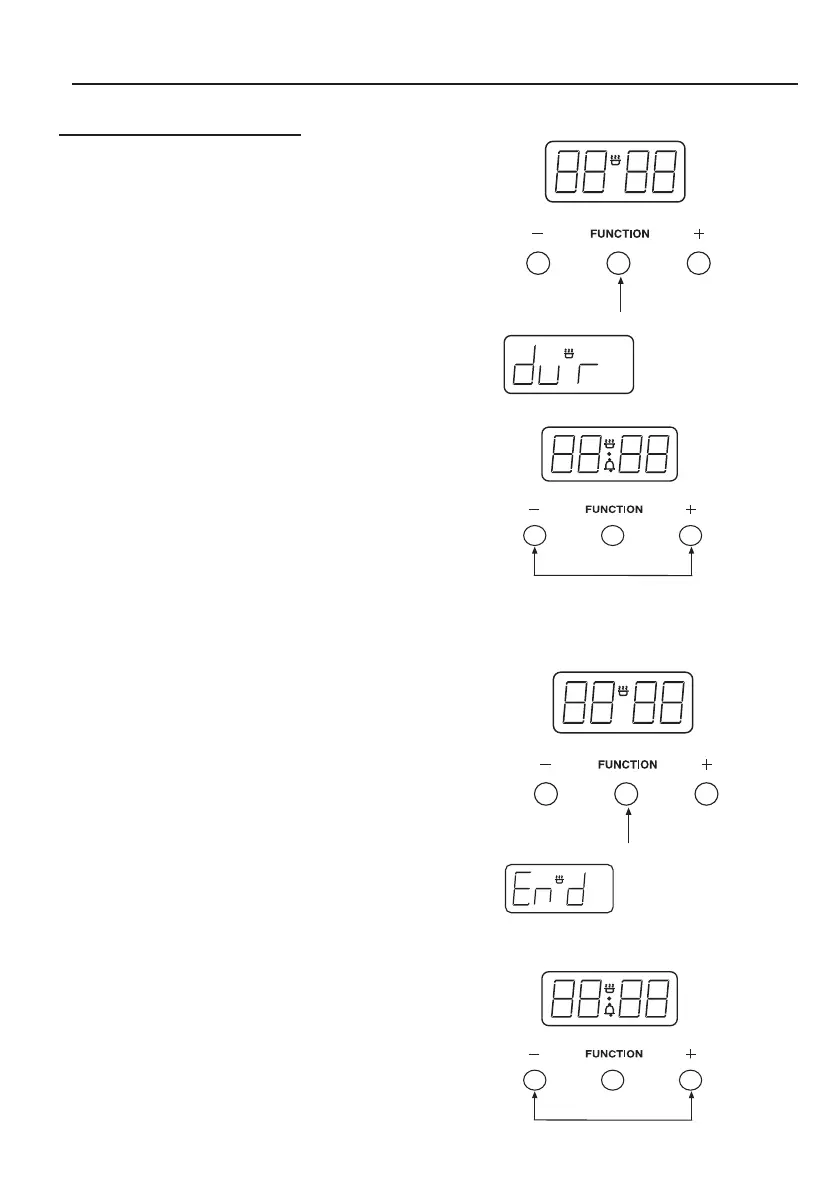
The ‘Duration’ method
Press the ‘Function’ button twice,(1)
which will skip past the Minute
Minder.
The LED display will flash the word
‘dur’, (2) and the ‘A’ will flash on the
left hand side of the display.
Use the ‘Plus’ and ‘Minus’ buttons to
set the length of time you want to cook
for.(3) This must be done within 5
seconds or the time of day will show
again.
Once this is done the oven will auto-
matically switch off once the time has
elapsed, and the alarm will sound.
To switch off the alarm, press any
button. To view any remaining time
press the ‘Function’ button twice
The ‘End’ Time method
Press the ‘Function’ button three
times, which will skip past the Minute
Minder and the Duration programmer.
(4)
The LED display will flash the word
‘End’ and the ‘A’ will flash on the left
hand side of the display. (5)
Use the ‘Plus’ and ‘Minus’ buttons to
select the time the oven is required to
turn off. (6)
Once this is done the oven will turn
itself off at the time you have selected.
To switch off the alarm, press any
button.



 To Next Page