8
9
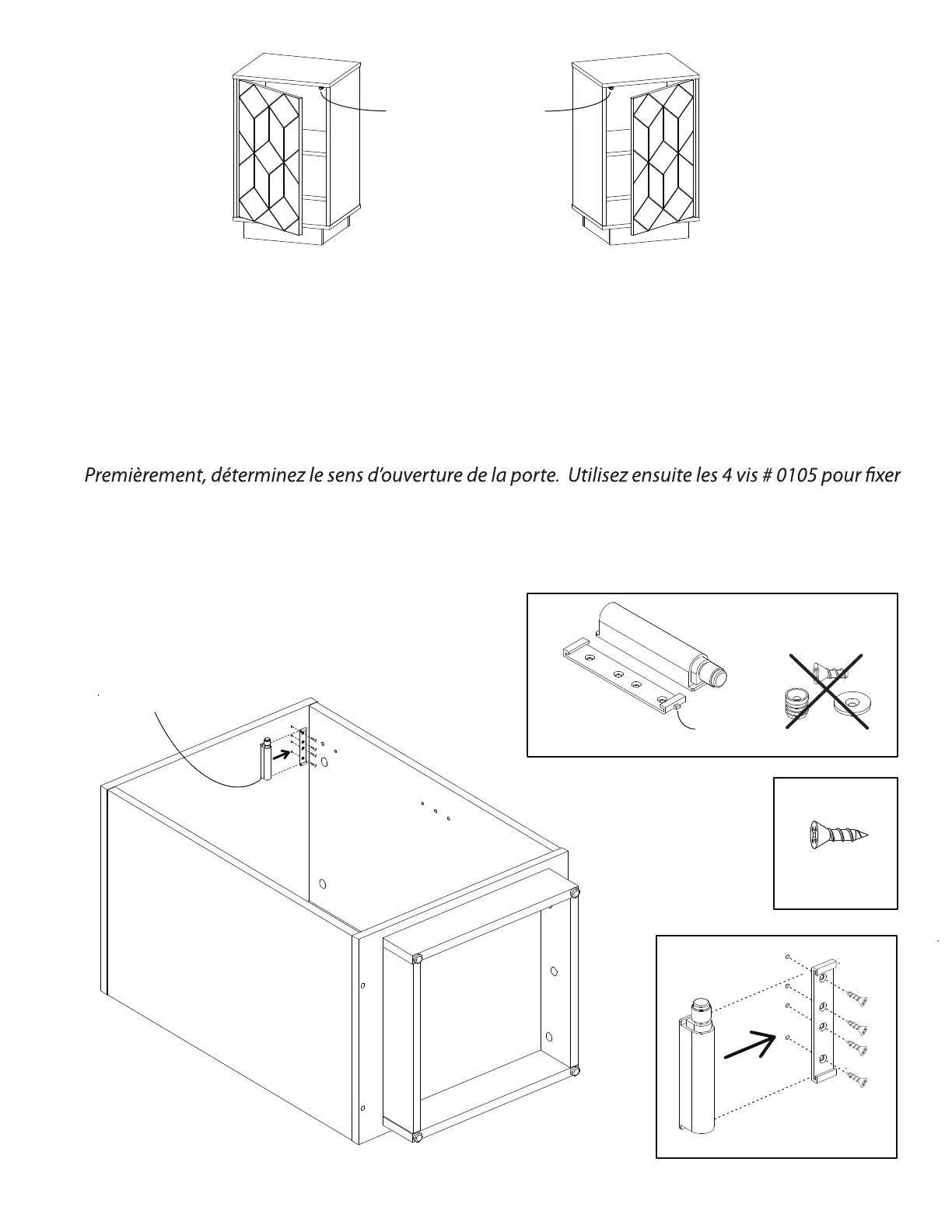
First, determine on which side the door will open. Then, use the 4 screws # 0105 to fasten
the mounting plate included in the push-to-open device kit # 2152. The mounting plate
must be installed underneath the panel C, on the left or right side. The small tab located
on the rear of the plate must be aligned towards the back of the unit. Finalize the step by
snapping-in the push-to-open device into the mounting plate, from the side
Right hand opening
Ouverture à droite
Push-to-open device
Poussoir à ressort
Left hand opening
Ouverture à gauche
# 0105
4x
KIT
Discard
Jetez
1x
# 2152
Small tab
Petit onglet
la plaque de montage incluse dans le kit de poussoir à ressort # 2152. La plaque de montage doit
être installée sur la face inférieure du panneau C, du côté gauche ou droit. Le petit onglet placé à
l’arrière de la plaque de montage doit être aligné vers l’arrière de l’unité. Terminez cette étape en
insérant le poussoir à ressort par le côté
# 2152
# 0105
A
B
C
M
D
M
Small tab
Petit onglet


 To Next Page