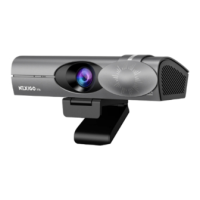
Need help?
Do you have a question about the Nexigo HelloCam and is the answer not in the manual?
Unlock Windows devices using facial recognition for enhanced security.
Three methods to position the webcam: flat surface, monitor mount, or tripod.
Step-by-step instructions for connecting the webcam via USB cable.
Requirements for Windows Hello setup, including updates and PIN creation.
Steps to start and configure Windows Hello facial recognition on your computer.
Finalizing face scan, improving recognition, and using Hello for login.
 General
| Frame Rate | 30 fps |
|---|---|
| Field of View | 90 degrees |
| Connectivity | USB 2.0 |
| Lens | Glass lens |
| Focus Type | Fixed focus |
| Privacy Cover | Yes |
| Resolution | 1080p |
| Compatibility | Windows, macOS |
| Mounting | Clip |
| Microphone | Built-in dual noise-cancelling microphone |

 To Next Page