7
Tape Operation
Maintenance
Tape Deck Maintenance
To ensure quality recording and playback of the tape deck,
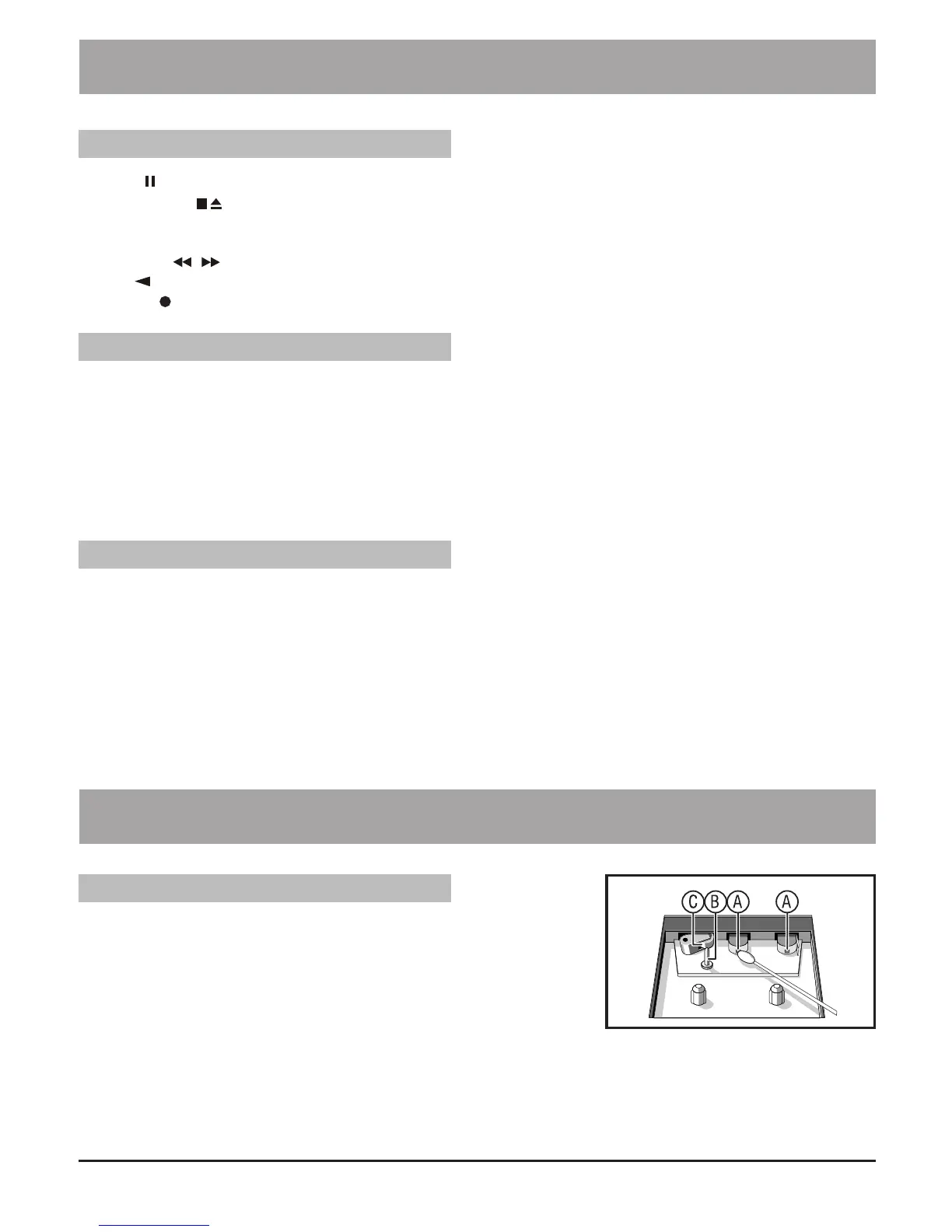
clean parts A, B and C shown in the diagram (after approximately
50 hours of operation, or an average of once a month).
Use a cotton bud slightly moistened with alcohol or a special head
cleaning uid to clean the deck.
1. Open the cassette door by pressing STOP • EJECT.
2. Press PLAY and clean the rubber pressure rollers C.
3. Press PAUSE and clean the magnetic heads A and also the Capstan B.
4. After cleaning press STOP • EJECT.
Note: Cleaning the heads can also be done by playing a cleaning cassette through once.
PAUSE Press to temporarily stop the tape playing. Press again to resume operation.
STOP/EJECT Press to stop the tape playing. Press again to open the cassette door after the
tape spools stop turning.
FAST FORWARD
& REWIND Press to start rapid tape winding; either forward or in the reverse direction.
PLAY Press to start playing the tape.
RECORD • Press the “RECORD” and “PLAY” buttons together to start recording.
1. Set the “FUNCTION” selector to “TAPE” mode.
2. Press the “STOP/EJECT” button to open the cassette door and insert your tape.
3. Close the cassette door .
4. Press the “PLAY” button to play the tape.
5. Adjust the “VOLUME” control to the desired level.
6. Press the “PAUSE” button when you want to stop playing the tape temporarily.
7. Press the “STOP/EJECT” button when nished.
1. Press the “STOP/EJECT” button to open the cassette door and insert a blank tape.
2. Select the source you want to record.
To record from the radio: Set the “FUNCTION” selector to “RADIO” mode and adjust to the
desired station.
To record from CD: Place a disc in the CD compartment. Set the “FUNCTION” selector to
“CD” mode and select the desired track.
3. Press the “RECORD” and “PLAY” buttons together to start recording.
4. Press the “STOP/EJECT” button when nished.
General Operation
Playback
Recording


 To Next Page