4.6 TWO WAY AUDIO
When you are viewing camera, you can press the “Microphone
Icon” as indicated in Figure 8 above and talk or if the volume on
the phone is up the voice from the camera could be heard in
the phone.
4.7 INFRARED ALARM
The camera uses infrared sensors when someone/something
appears within its detection area. The alarm on camera will
ring for 5 seconds, and at the same time, the phone will also ring
and receive an alarm notification. Set the alert notification
message to access the live video feed.
You can adjust the timing of the alarm and enable/disable the
alarm sound under the camera setting.
NIGHT VISION
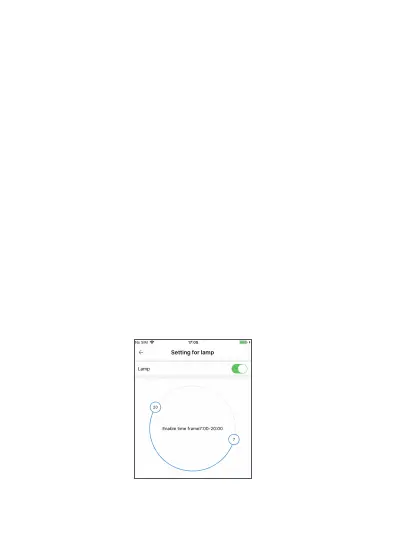
There are two night vision mode: infrared night vision and white
lamp night vision. Infrared night vision is on automatically when
it is getting dark enough. White lamp can be turned on by
“lamp”-”settings” on the APP, as per the diagram below:
Besides switching the white lamp on, users can also set the time
frame for the white lamp.
10


 To Next Page