4.5 VIDEO LOCK
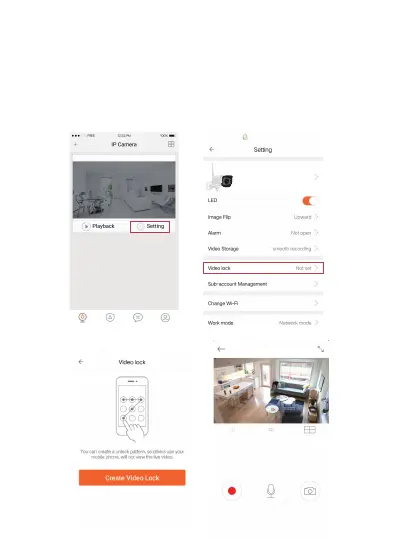
This function allows the user to watch live video and replay
videos only after a password has been setup.
1) To set up, click on the ‘Setting’ button in the IP camera
page as indicated in Figure 5 & 6 below.
2) In the Setting screen, tap on the ‘Video Lock’ button
[defaulted to ‘Not Set’] as indicated in Figure 7 below.
3) Draw an pattern to creat video lock.
Jawa
Jawa
Figure 5 Figure 6
Figure 7 Figure 8
-9-
NEXTECH
NEXTECH


 To Next Page