EasyManua.ls Logo

Nexus 21 DL-50 - Connecting the Lift

Nexus 21 DL-50
28 pages
Print Icon
To Next Page IconTo Next Page
To Previous Page IconTo Previous Page
Loading...
9
Connecting the Lift
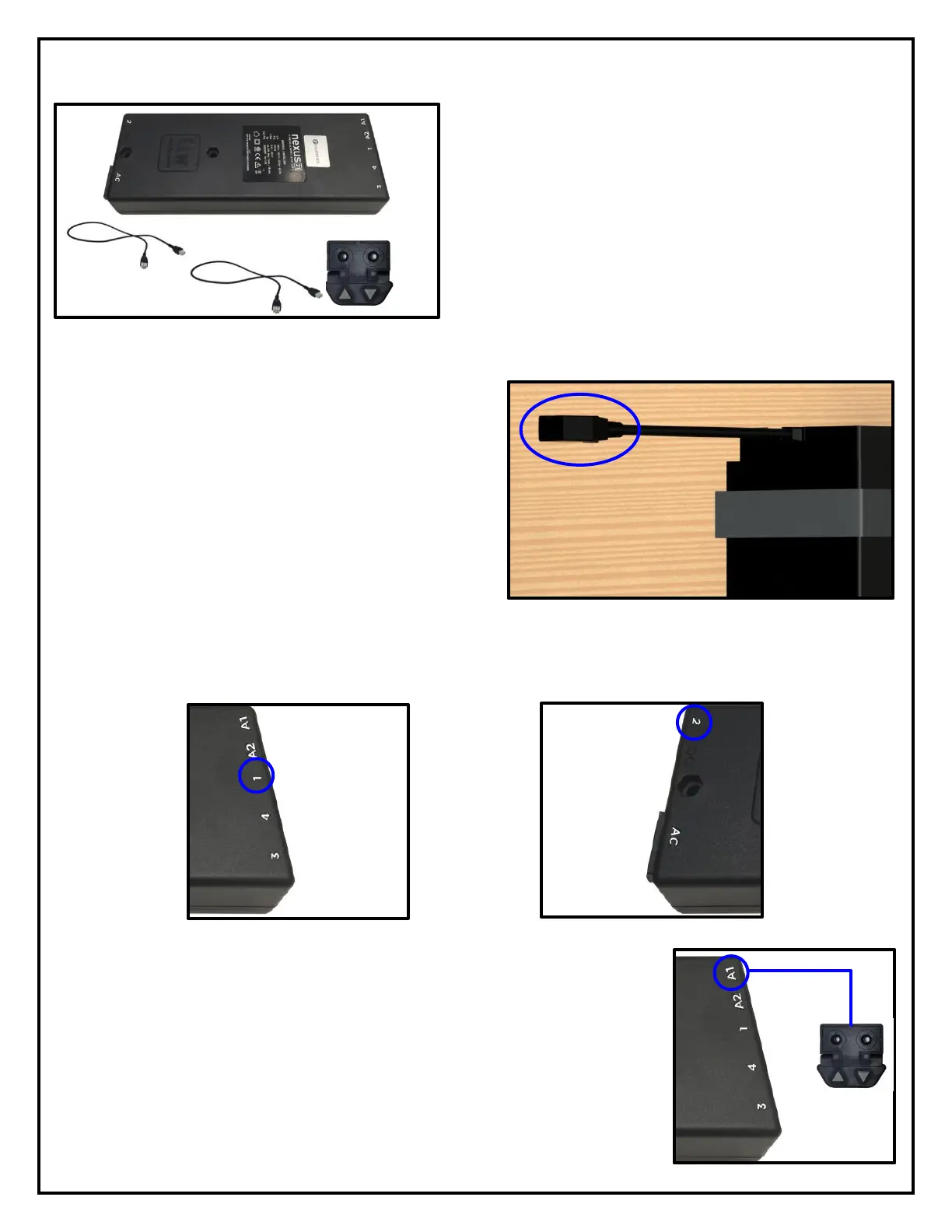
For these steps you will need the following parts:
Control Box
Power Cord
Wired Backup Switch
(2) 2.5m Motor Cables
CSI Control Kit (If IR was ordered)
RF Control Kit (If RF was ordered)
(2) #10 x 1-¾” FHWS
(4) #8 x ¾” FHWS
Step 2: Connect (1) 2.5m Motor Cables to each
pigtail at the top of each Lift Column.
Step 3: Connect one 2.5m Motor Cable to Port 1 and the other 2.5m Motor Cable to Port 2 on the Control
Box.
Step 4: Connect the Wired Backup Switch to Port A1 on the Control Box, if
you are using RF Controls. Connect the IR Receiver to Port A1 on the Control
Box, if you are using IR Controls.

Related product manuals