Doc# E107754 V.1.03 QS - 6
Nexus® 1252 Meter Quickstart
Electro Industries/GaugeTech
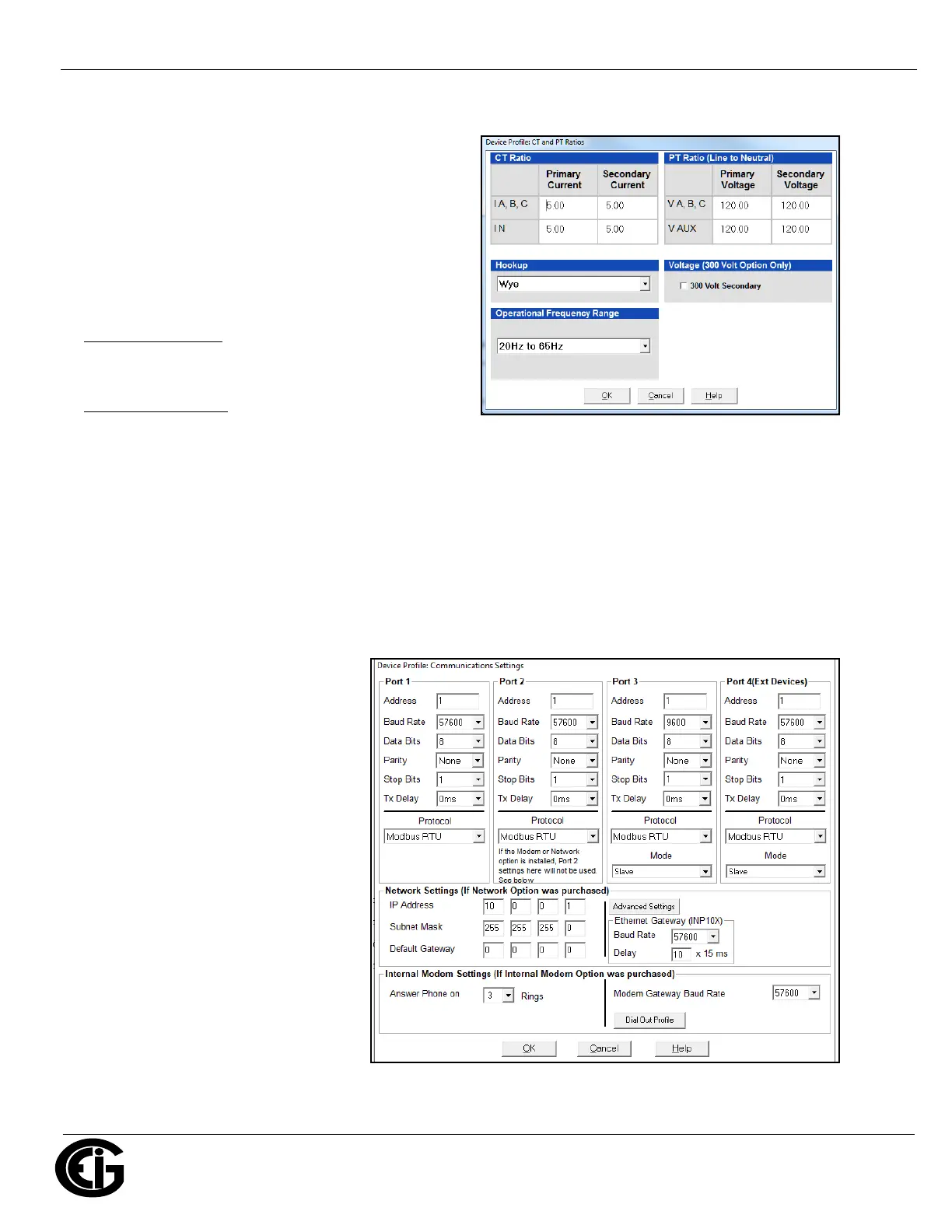
Program CT, PT Ratios:
1. From the Device Profile screen,
double-click General Settings>CT, PT
Ratios and System Hookup>one of
the items in the list.
a. Enter CT Ratios: Primary (1-65535) and
Secondary (1-65536) current.
b. Enter PT Ratios: Primary (1-99999999)
and Secondary (1-65535) voltage.
Example CT Setting
:
200/5 Amps: set the Primary current value as 200.00
and the Secondary current value as 5.
Example PT Settings
:
14400/120 Volts: set the Primary voltage
value as 14400.00 and the Secondary voltage as 120.00.
c. Select the Hookup (Wye, Delta 3 CTs, Delta 2 CTs, 2.5 Element Wye, or 4 Wire Delta).
d. Operational Frequency Range (20 Hz to 65 Hz, 350 Hz to 500 Hz, or 20 Hz to 500 Hz).
e. 300 Volt Secondary - note that you will only see this field if your meter has the G option. Check the box to
use the 300 V Secondary.
f. Click OK.
Program Communications Setting:
1. From the Device Profile screen,double-click General Settings>Communications>a listed port.
2. The settings shown here are the default
settings for the four serial ports (ports
1-4), the Network Option and the
Internal Modem Option. You can change
the settings, if necessary, for your
system. You can use one of the Nexus®
External Displays to learn the current
baud rate, address and communication
protocol of each meter port - see
Section 6.5 in the meter’s User Manual
for instructions.
IMPORTANT! In order to prevent commu-
nication problems, be careful when making
changes in the Communications Settings
screen. For example, if you change the
baud rate of the port connected to a com-
puter, be sure to make the same change to
the computer port's baud rate. If you
change a port's address, be sure to update the address settings of any device that communicates with the port.



 To Next Page