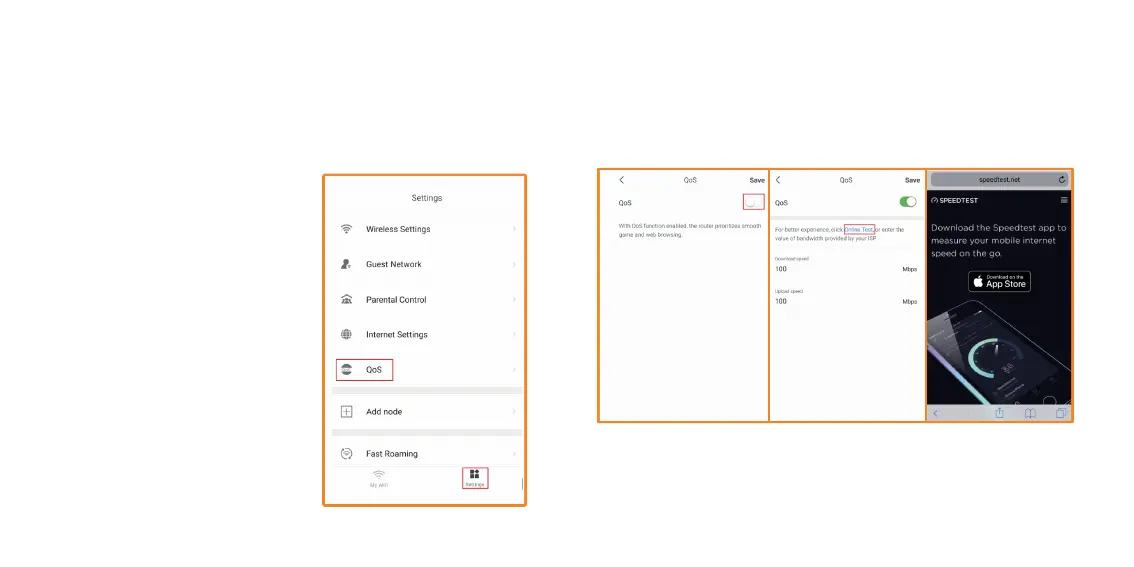
1. Open Nexxt Wireless app. Tap
on Settings. Then tap on QoS.
With QoS function enabled, the
router prioritizes smooth game
and web browsing. This means,
you can allocate a certain
amount of bandwidth for online
games and web browsing.
2. Tap on the switch to enable QoS. You will need to know what your
download/upload speeds are. Tap on Online Test, it will take you to run
a speed test from the Speedtest app. For this example, we will say
100Mbps download and 100Mbps upload.
QoS – Prioritizes devices for smooth gaming and web browsing. These
devices will always have the best access, when connected. To run
speed test, click on Online Test, to install Speedtest.net app and
determine your Internet speed.
How to use QoS - Quality of Service.


 To Next Page