PRESSURE OPERATION
VIEWING PRESSURE, TEMPERATURE AND
HUMIDITY CHARTS
• The bar chart in Pressure Window can be congured
to display historical data for the sea level pressure and
temperature or humidity for channel 1.
• After selecting the Pressure Window, press and hold
ALARM button to toggle the bar chart between the sea
level pressure with the word “PRESSURE” displayed at
the right bottom corner of the chart, temperature with a
thermometer icon and “CH1” and a humidity with “RH”
icon and “CH1”.
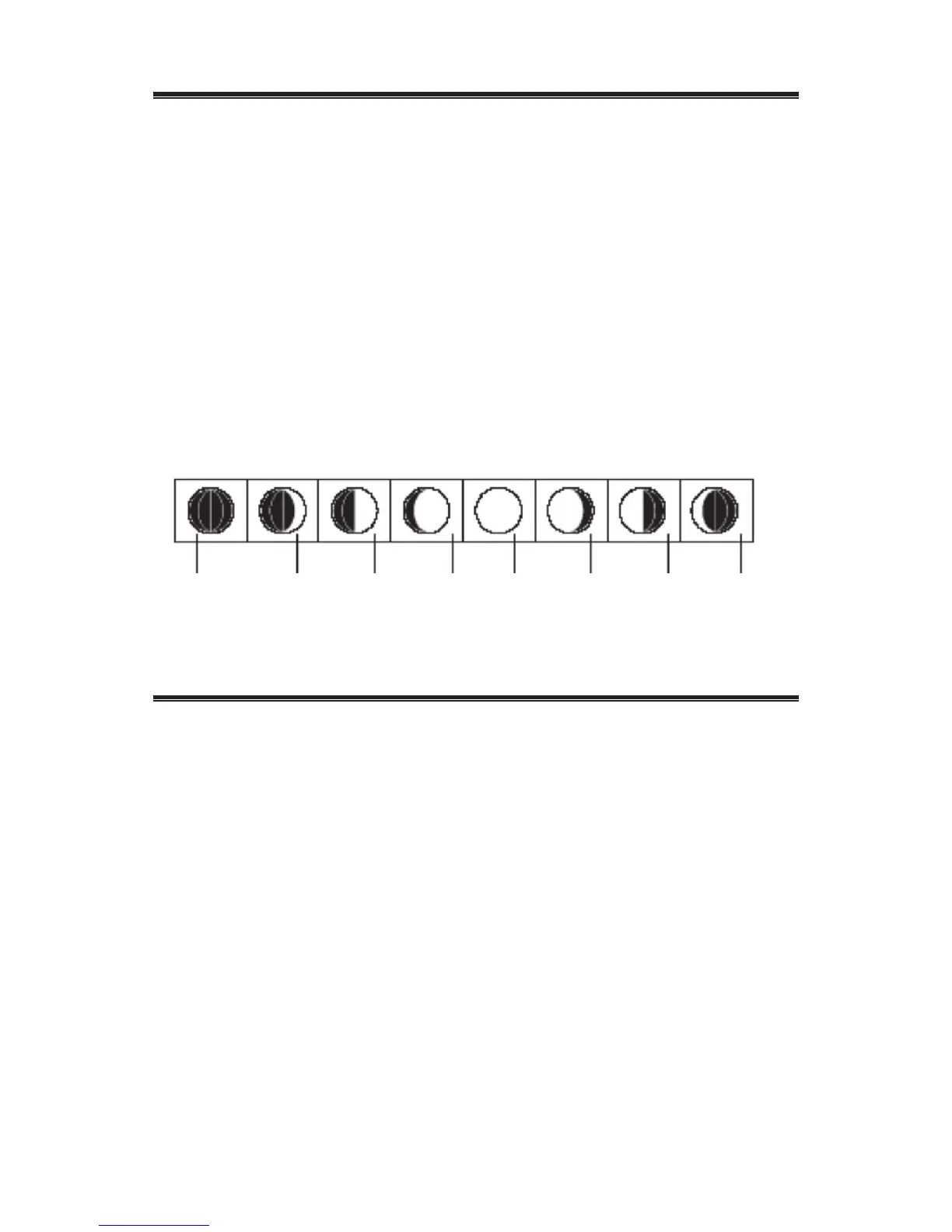
MOON PHASE ICONS
TEMPERATURE/ HUMIDITY WINDOW
• The main unit supports up to 3 remote sensors,
corresponding to a separate channel of the temperature
and relative humidity display. The temperature can be
displayed in Celsius (ºC) or Fahrenheit (ºF).
• The main unit carries the temperature and humidity
sensor and uses this data to calculate an indoor comfort
level - Wet, Comfort or Dry.
• A temperature alert function is available for all
channels. It can be programmed to sound if the channel
temperature exceeds or falls below the pre-set upper
and lower limits.
REMOTE SENSORS STATUS
• The wave icon above the current channel icon shows the
connection status of the corresponding remote sensor:
16
New
Moon
Waning
Crescent
Waxing
Crescent
First
Quarter
Last
Quarter
Waxing
Gibbons
Full
Moon
Waning
Gibbons


 To Next Page