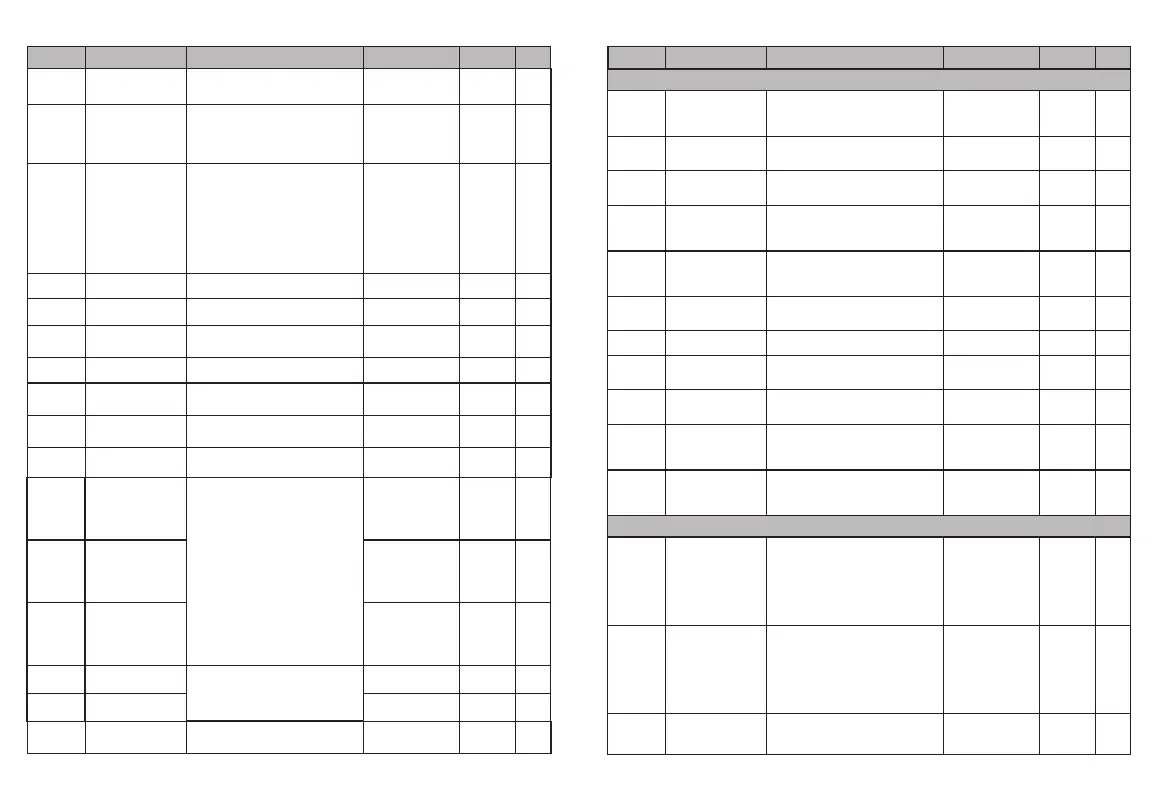
F3.07
Terminal function
detection selection
at power-up
0~1
0
○
0: Terminal Run command invalid on power-up
1: Terminal Run Command Valid on Power-on
F3.08
UF/DOWN Terminal
Frequency
Modification Rate
0.01~50.00Hz/S
1.00
○
This function code is to set the frequency
modification rate when the UP/DOWN
terminal sets the frequency, that is, the
UP/DOWN terminal is shorted to the
COM terminal by 1The magnitude of the
frequency change in seconds.
F3.09
Input Terminal Valid
Logic Setting (X1-X4)
0000~1111
○
LED bits: X1 logic select
LED ten bits: X2 logic select
LED hundred bits: X3 logic select
LED thousand bits: X4 logic select
0 indicates positive logic, i.e. the connection
between the Xi terminal and the common
terminal is valid, and the disconnection is
invalid
1: Indicates inverse logic, that is, the
communication between the Xi terminal and
the common terminal is invalid, and the
disconnection is valid
0
F3.10
Reservation
— — —
◆
F3.11
Ai1 Input Lower Limit
Set AI1 Lower Limit
0.00V/0.00mA~
5.00V/20.00mA
0.00
○
F3.12
Ai1 Lower Limit
Corresponding Setting
The lower limit of AI1 is set to correspond to
the setting, which corresponds to
Percentage of upper limit frequency
-100.0%~100.0%
0.0%
○
F3.13
Ai1 Input Upper Limit
Set AI1 upper limit
0.00V/0.00mA~
5.00V/20.00mA
5.00
○
F3.14
Ai1 Upper Limit
Corresponding Setting
Set the AI1 upper limit corresponding
setting, which corresponds to
Percentage of upper limit frequency
-100.0%~100.0%
100.0%
○
F3.15
Ai1 Analog Input Signal
FilteringWave time
constant
This parameter is used where the AI1 input
signal is filtered Reason, in order to
eliminate the influence of interference.
0.1~5.0s
0.1s
○
F3.16~
F3.20
—
—
—
◆
F3.21
Open Collector Output
Terminal Y Setting
0~18
2
×
F3.22
0: Idle
1: Frequency converter in operation
2: Frequency Converter Fault
3: Frequency/Speed Level Detection
Signal (FDT)
4: Frequency/Speed Arrival Signal (FAR)
5: The frequency converter is running at
zero speed
6: Frequency converter overload pre-alarm
7: The frequency converter is ready for
operation
8: Output frequency reaches upper limit
9: Output frequency reaches lower limit
10: Communication Settings
11: Alarm Output (Continue)
12: external failure shutdown
12 to 18: retain
—
—
◆
—
—
◆
F3.23
Delay from the change of the state of the
switching value output terminal Y to the
change of the output
Y Output Delay Time
F3.24
F3.25
Y OFF Delay Time
0.0~255.0s
0.0~255.0s
0.0
0.0
×
×
F3.16~
F3.20
—
—
—
◆
F 4 G r o u p - P r o t e c t i o n P a r a m e t e r s
F4.00
Voltage limiting factor
0: off, 1 to 101
20
This parameter is used to adjust the ability
of the frequency converter to suppress
overvoltage during deceleration.
Encountered the motor coefficient setting
101 with large inertia
×
F4.01
Overvoltage limit level
350~600/400
~850V
370/700V
The overvoltage limit level defines the time
of overvoltage stall protection Operating
voltage of
×
F4.02
Accelerating current
limiting coefficient
0: off, 1-100
This parameter is used to adjust the frequency
converter during acceleration
Ability to suppress overcurrent
×
20
F4.03
Accelerating current
clipping level
50%~250%
160%
The current limiting level defines the
current threshold for automatic current
limiting, and its set value is the percentage
relative to the rated current of the
frequency converter.
×
F4.04
Fault automatic
reset times
0~10
0
When the number of obstacle resets is
set to 0, there is no automatic reset
function, only manual reset, and 10
means that the number of times is not
limited, i.e. countless times.
×
F4.05
Automatic fault
reset interval
Time
0.5~25.0s
Set Automatic Failure Reset Interval
×
3.0s
F4.06
Output phase-out
protection coefficient
0.0~20.00
Setting Input Phase Default
Protection Factor
10.00
○
F4.07
Constant speed
current limiting
coefficient
0:off,1~5000
This parameter is used to adjust the ability
of frequency converter to suppress
overcurrent in constant speed process.
×
0
F4.08
Undervoltage
protection level
50~280/50
~480V
This function code specifies the allowable
lower limit voltage of DC bus when the
frequency converter works normally.
×
180/360V
F4.09
Overload pre-alarm
level of frequency
converter
0~150%
0~150%
The current threshold of overload
pre-alarm action of frequency converter
is set as a percentage relative to the
rated current of frequency converter.
○
F4.10
Overload Prealarm
Delay of Frequency
Converter
0.0~15.0s 5.0s
The delay time between the output current
of the frequency converter continuously
exceeding the amplitude of the overload
pre-alarm level (F4.09) and the output of the
overload pre-alarm signal.
×
G r o u p F 5 - P I D c o n t r o l p a r a m e t e r s
F5.00
PID given quantity
input channel
0~8 7
0: given by number
The PID assign amount is given by a number
and set by that function code F5.01
1: AI1
2-6: retain
7: given pressure (MPa, Kg)
8: panel potentiometer
○
F5.01
Set a given number
0.0~100.0% 50.0%
Use the operating keyboard to set the given
amount of PID control. This function is valid
only when the PID given channel selection
number is given (F5.00 is 0 or 8). If
F5.00 is 8, use as pressureGiven the force,
this parameter is consistent with the unit
of F5.04.
○
F5.02
PID Feedback Input
Channel
0~1 0
0AI1
1:Reserved
○
-12--11-
Function
Code
N a m e
C o n t e n t
S e t R a n g e
Factor y
Sett ings
Change
Function
Code
N a m e
C o n t e n t
S e t R a n g e
Factor y
Sett ings
Change
Reservation
Reservation
Reservation
Reservation


 To Next Page