EasyManua.ls Logo

Nike TRIAX C8 - Interval Training Mode; Setting Training Intervals

Nike TRIAX C8
17 pages
Print Icon
To Next Page IconTo Next Page
To Previous Page IconTo Previous Page
Loading...
12
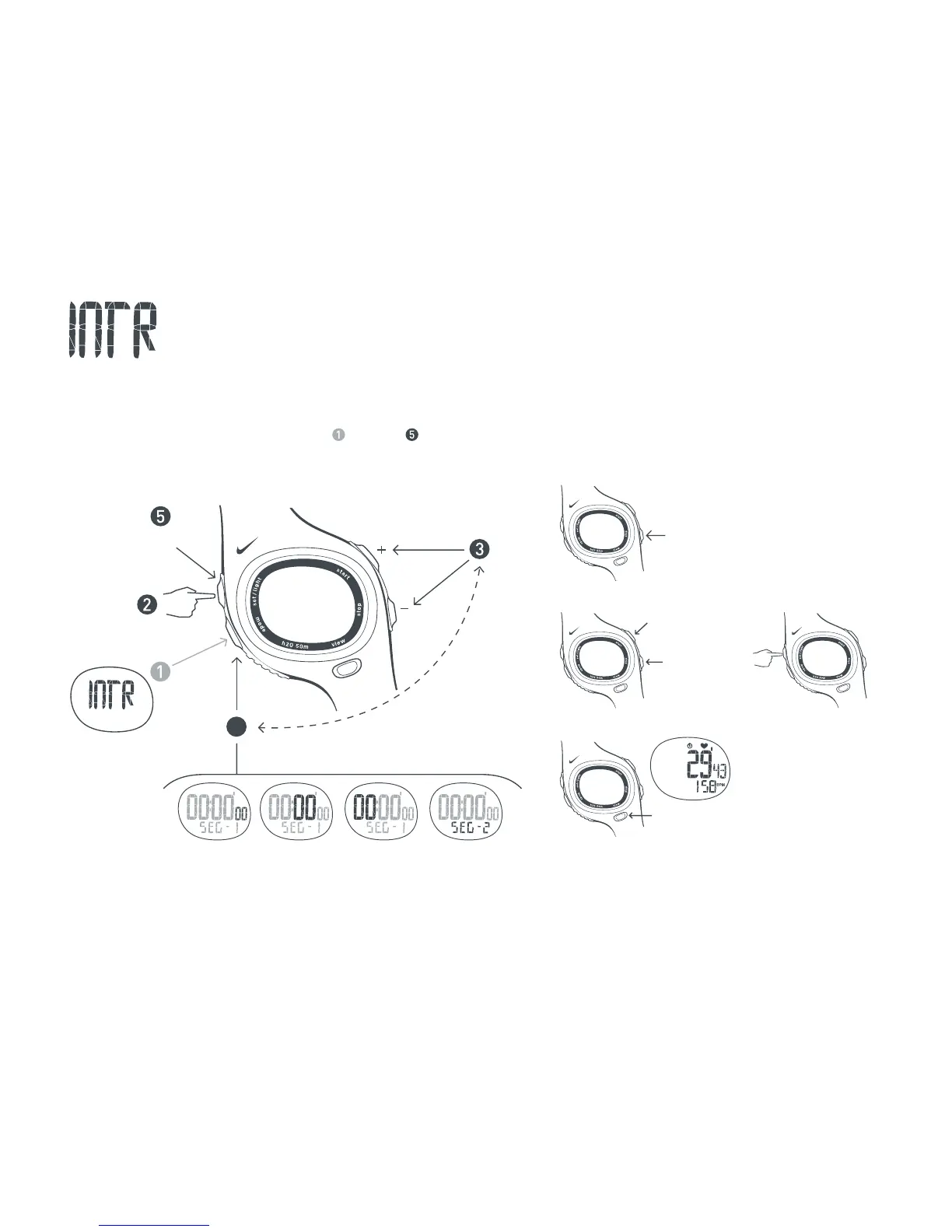
Press button to select
adjustable element.
Scroll to
INTERVAL mode
4
4 SEC
EXIT
Segment 1
Set seconds
Segment 1
Set minutes
Segment 1
Set hours
Switch to
segment 2
Cycle Segments
Press button to select
beginning segment.
Timer must be reset.
See Reset Countdown.
Start
Countdown
Stop
Countdown
Reset
Countdown
2 SEC
View Heart Rate
Press button to view
current heart rate in
secondary display
during any segment.
INTERVAL mode features a 2 segment countdown timer. You can use this as an interval training tool by exercising at
a higher intensity for a certain period of time, followed by a recovery interval at a lower intensity level. You can set 2 timed
segments for your workout. As each segment is completed, the next begins. All segments will continue to repeat
until the timer is stopped. Follow steps through to set your training intervals.
Setting Training Intervals

Other manuals for Nike TRIAX C8

Related product manuals