EasyManua.ls Logo

Nike TRIAX C8 - Data Mode: Reviewing Runs; Viewing Saved Run Data

Nike TRIAX C8
17 pages
Print Icon
To Next Page IconTo Next Page
To Previous Page IconTo Previous Page
Loading...
13
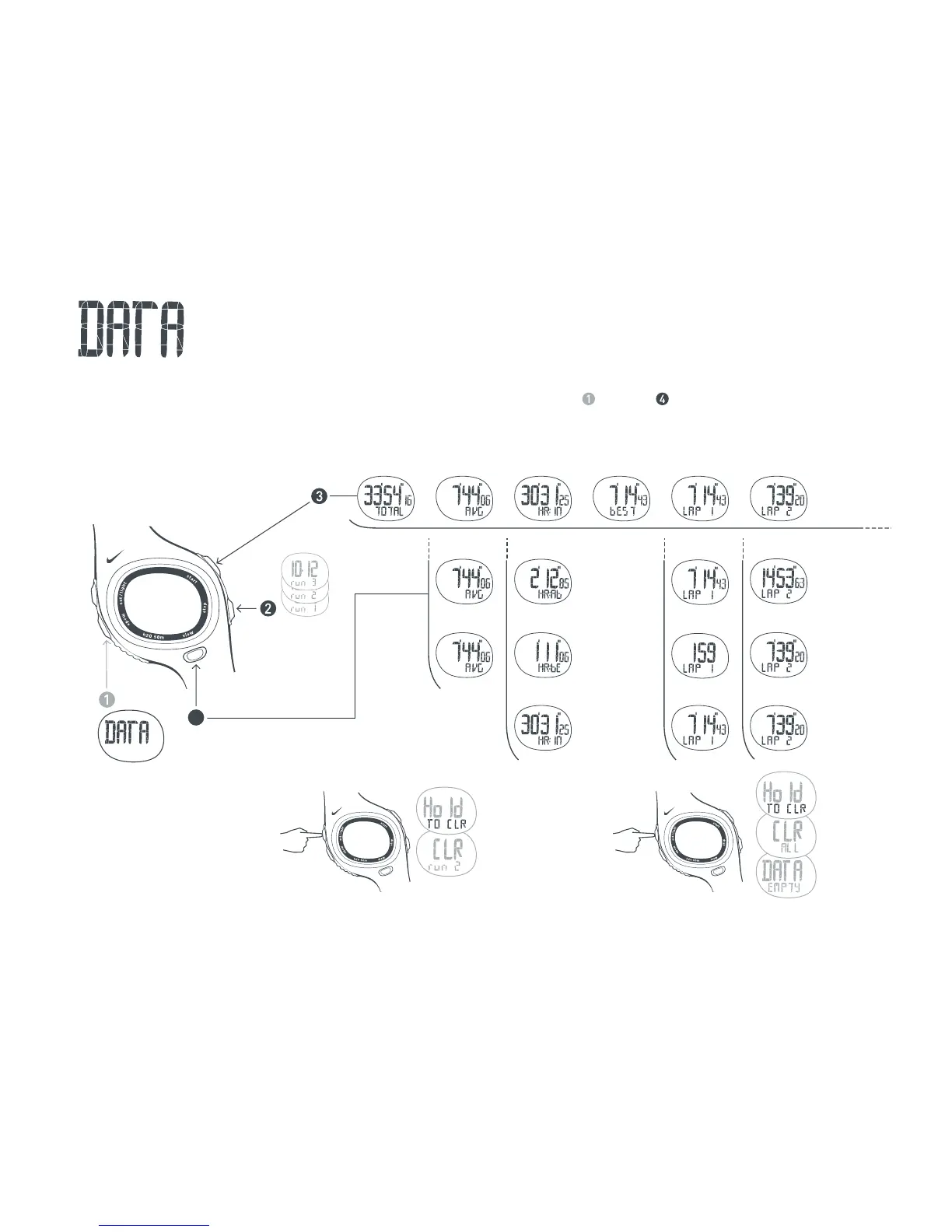
In DATA mode you can review detailed information about your saved runs. The memory can store multiple runs with
up to 50 laps each. See page 8 for saving runs to DATA mode. Follow steps through to view data saved for each run.
Review Saved Runs
Scroll to
DATA mode
4
Press button to view
stats in each category.
Select a Run
Date of run
appears in
primary display.
HR Zones
will not appear if
they are turned
OFF during
recording.
NOTE: If RUN 2 is deleted,
RUN 3 becomes RUN 2.
Total Time
Averages
Average HR
Average Lap
HR Zone
In Zone
Above Zone
Below Zone
Best Lap Lap 1
Lap 1 Time
Total Time
Average HR
Lap 2 Lap 3 up to 50
Total Time (Lap 1 + Lap 2)
Average HR
Lap 2 Time
Clear ALL Runs
3 SEC
Clear This Run
3 SEC

Other manuals for Nike TRIAX C8

Related product manuals