II
ALPHA 220
DISASSEMBLY
CABINET COVER REMOVAL
Remove four tapping screws from the top
of the unit.
Remove four
screws from both
sides of the unit.
Lift the cabinet cover away from the unit.
BOTTOM PLATE REMOVAL
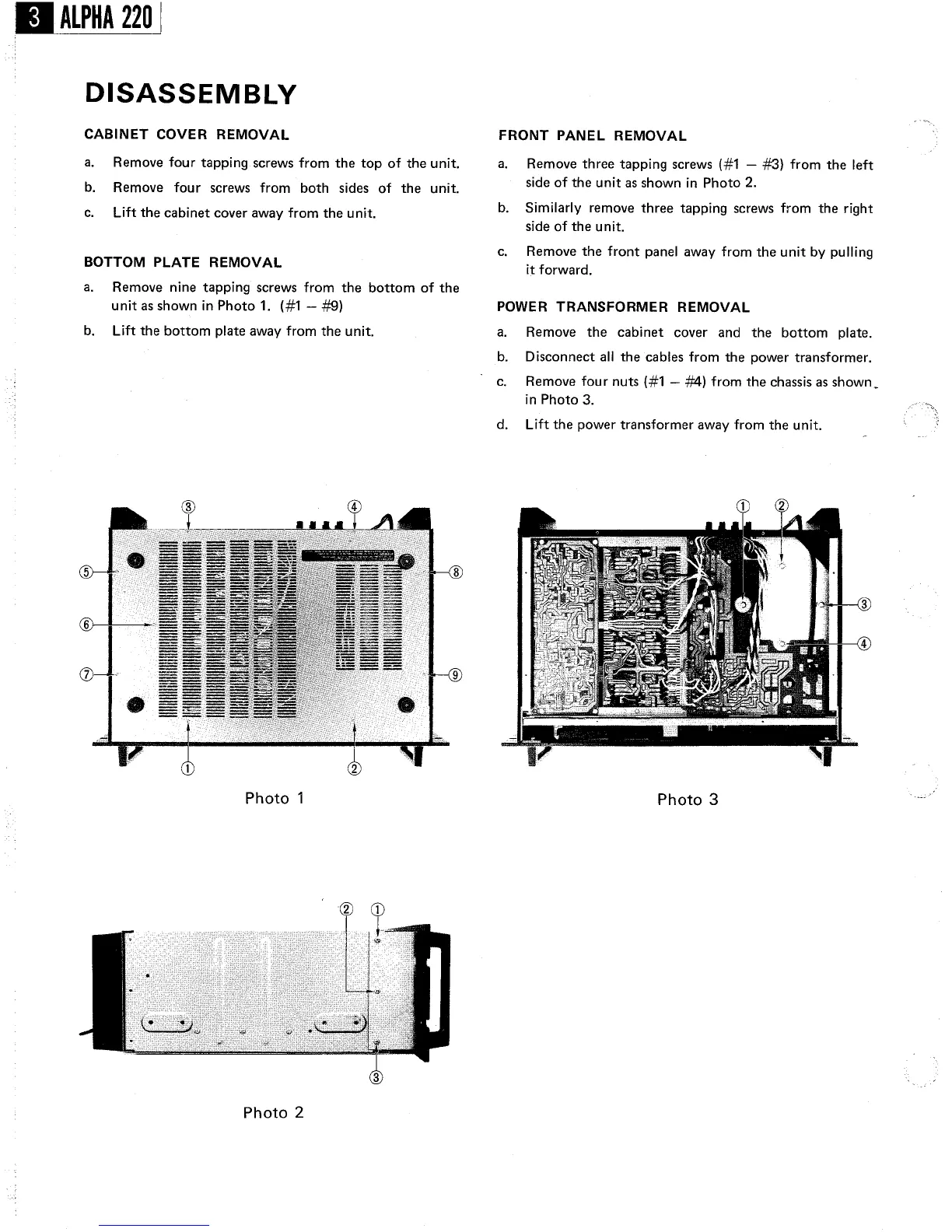
Remove nine tapping screws from the bottom
of the
unit as shown in Photo 1. (#1
- #9)
Lift the bottom plate away from the unit.
Photo
Photo 2
FRONT PANEL REMOVAL
Remove three tapping screws (#1
- #3) from the
left
side of the unit as shown in Photo 2.
Similarly remove three tapping screws from the right
side of the unit.
Remove the front panel away from the unit by
pulling
it forward.
POWER TRANSFORMER REMOVAL
Remove the cabinet cover and the
bottom plate.
Disconnect all the cables from the power transformer.
Remove four nuts (#1
- #4) from the
chassis as shown
in Photo 3.
Lift the power transformer away from the unit.
Photo 3


 To Next Page