

EasyManua.ls Logo

Nikko R2-D2 - User Manual

Nikko R2-D2
26 pages
Print Icon
To Next Page IconTo Next Page
Loading...
Instruction Manual
Nikko Home Electronics logo is trademark of NIKKO Co., Ltd., NIKKO America, Inc. & NIKKO Europe B.V.
R2-D2
TM
WIRELESS WEBCAM WITH Skype
TM
This product uses a wireless USB
camera. The image might not be
clear depending on signal reception
condition. The condition may improve if
you change the orientation of R2-D2 or
move it to a different location.
©2007 Lucas lm Ltd. & TM. All rights reserved.
“Skype, SkypeIn, SkypeOut, Skypecasts, Skype
Certi ed, Skype Me!,associated logos and the
“S” symbol are trademarks of Skype Limited.
Question and Answer IconNeed help?

Do you have a question about the Nikko R2-D2 and is the answer not in the manual?

Summary

SAFETY PRECAUTIONS

Meaning for the picture display

Explains symbols used in safety warnings to denote hazards and actions.

Disclaimer

Accessories

Product Accessories

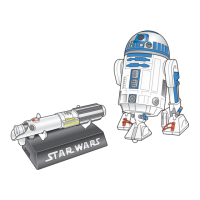
Lists all included accessories like R2-D2 unit, lightsaber, stand, cables, batteries, and manuals.

Connectable Personal Computers

System Requirements

Details the system requirements for hardware and software to use the product.

Parts Identification and Function

R2-D2 (Web camera) Identification

Identifies and explains the features of the R2-D2 unit, including camera, mic, LED, and sensors.

Lightsaber (USB Phone) Identification

Identifies and explains the features of the lightsaber, including indicator, speaker, mic, and buttons.

Lightsaber Button List and Functions

Details the functions of each button on the lightsaber for operation and dialing.

Stand (Controller) Identification

Identifies and explains the features of the stand, including the arm, USB connector, and lamp.

Install Software

Software Components

Lists the necessary software components including Skype, drivers, viewer, and codecs for product functionality.

Pre-installation Checks

Guides users on verifying DirectX version compatibility before proceeding with software installation.

Software Installation Steps

Provides step-by-step instructions for installing the product's software from the provided CD.
Nikko R2-D2 Specifications

General IconGeneral
BrandNikko
ModelR2-D2
CategoryWebcam
LanguageEnglish