29
More on Movies
HDMI Output
The camera can be connected to HDMI devices for high-
denition movie playback and recording.
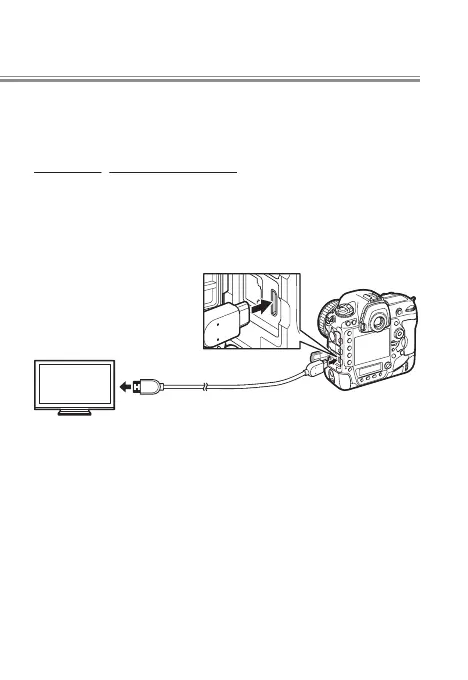
Connecting to an HDMI Device
The camera can be connected to high-denition video
devices using an optional High-Denition Multimedia In-
terface (HDMI) cable or a third-party type C HDMI cable.
Always turn the camera o before connecting or discon-
necting the cable.
Connect to camera
Connect to high-de-
nition device (choose
cable with appropriate
connector)
Tune the device to the HDMI input channel, then turn the
camera on and press the K button. During playback, im-
ages will be displayed on the television screen. Volume
can be adjusted using television controls; the camera con-
trols can not be used.
If the camera is connected to a third-party HDMI video re-
corder, you can lm movies and save them directly to the
device even if no memory card is inserted in the camera.
l


 To Next Page