EasyManua.ls Logo

Nikon D5500 - Page 101

Nikon D5500
583 pages
Print Icon
To Next Page IconTo Next Page
To Previous Page IconTo Previous Page
Loading...
WPS
(Android
Only)
1
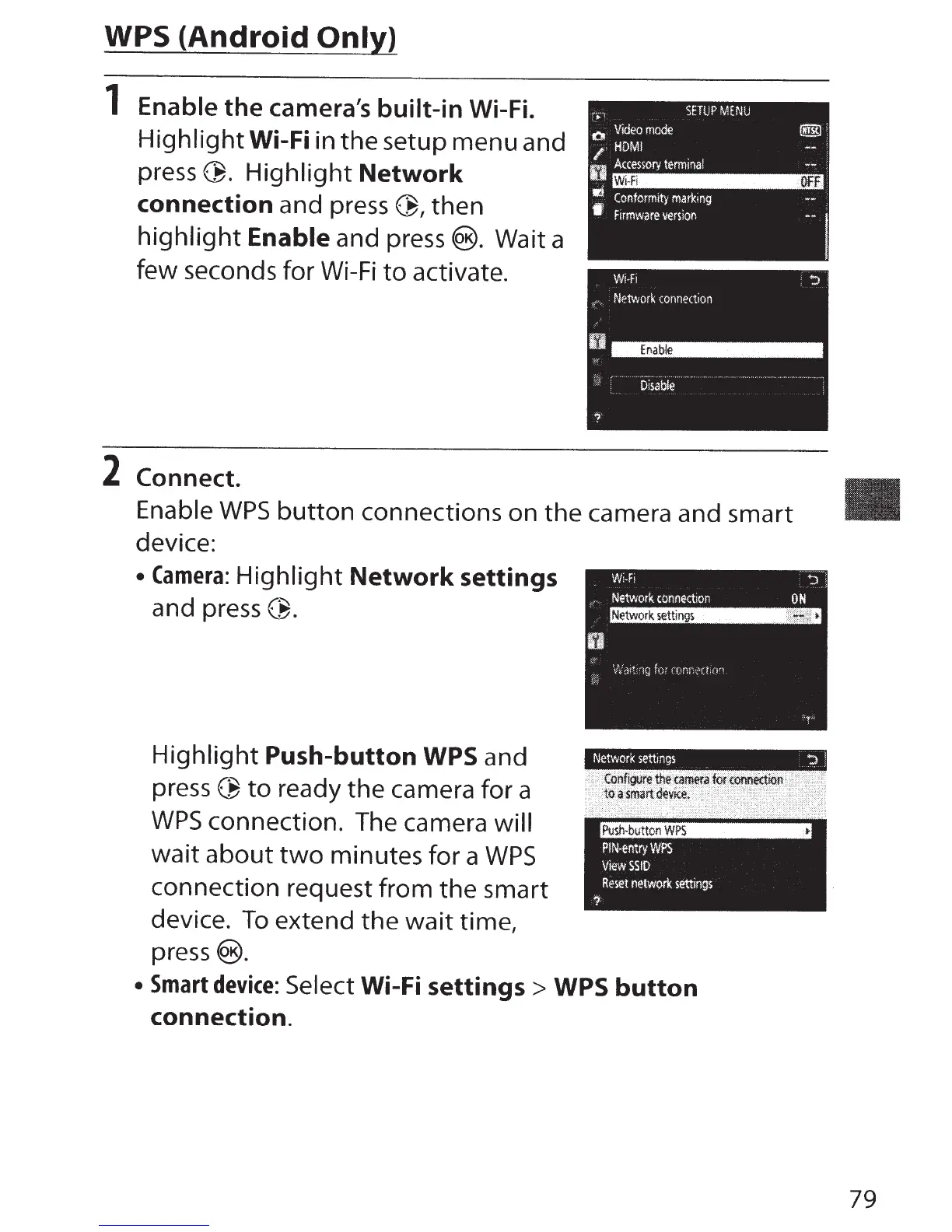
Enable
the
camera's
built-in
Wi-Fi.
Highlight
Wi-Fi
in the setup menu and
press~.
Highlight
Network
connection
and
press~'
then
highlight
Enable
and press@). Wait a
few seconds for
Wi-Fi
to
activate.
2
Connect.
Enable
WPS
button
connections on the camera and smart
device:
Camera:
Highlight
Network
settings
and
press~.
Highlight
Push-button
WPS
and
press
~
to
ready the camera for a
WPS
connection. The camera
will
wait
about
two
minutes for a
WPS
connection request from the smart
device.
To
extend the wait time,
press®.
Smart
device:
Select
Wi-Fi
settings
>
WPS
button
connection.
79

Table of Contents

Other manuals for Nikon D5500

Related product manuals