EasyManua.ls Logo

Nikon D5500 - Page 131

Nikon D5500
583 pages
Print Icon
To Next Page IconTo Next Page
To Previous Page IconTo Previous Page
Loading...
..
··
..
·•·
······
··
··
cl: "
i
.
·•.·
·
··
Ii
)··
..
.
..•
<.
i
....
...
.!..:
2:0.
<··.:··
,.!.
.
1•
·
-•
·
:c;;
.
t
I
~f-
:.
:
..
~
-
i
·.··.
····-··
i
. i
<
c
...
••
·
···
·· ··
•.•••.•.
•••••
.•.•••
< .
.•••••
. i :
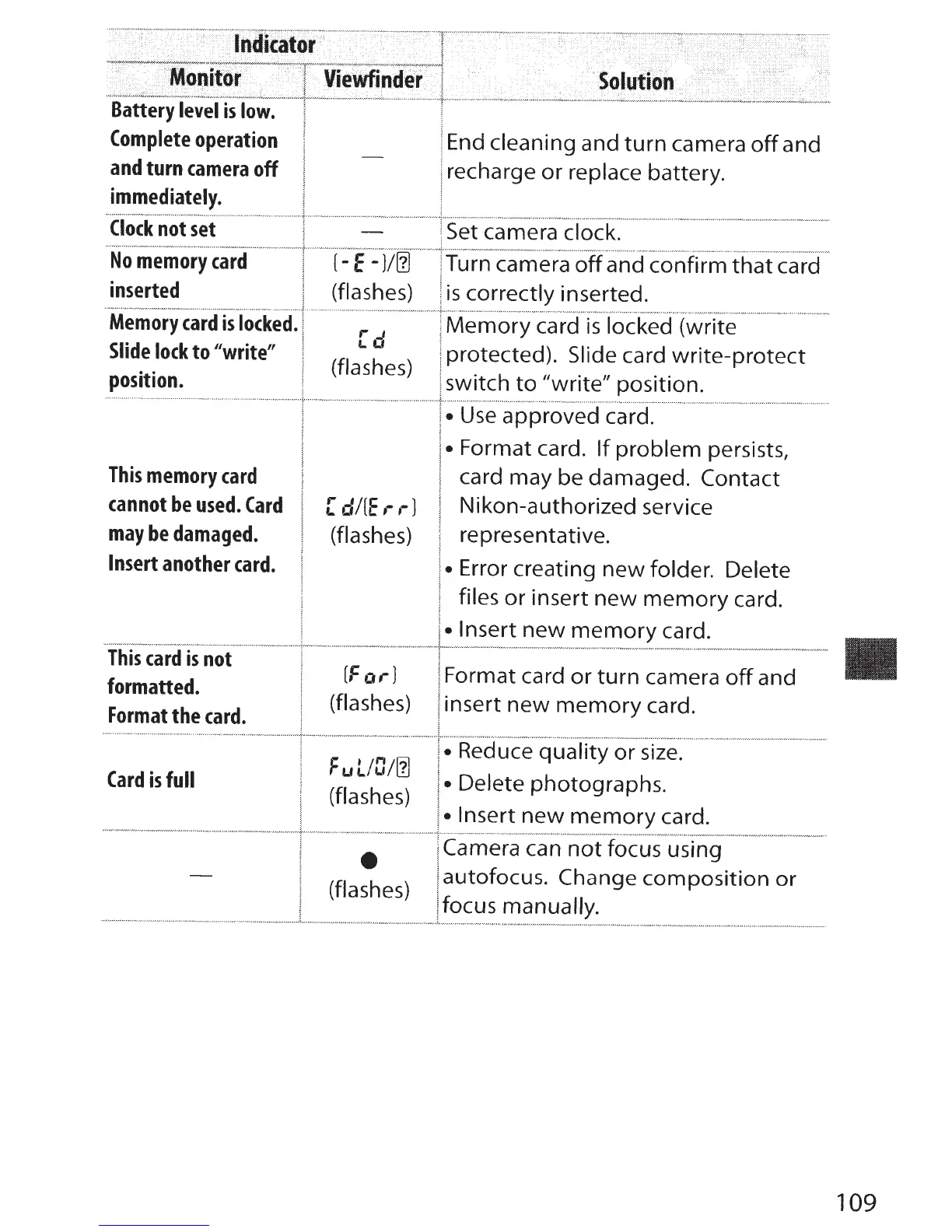
Battery
level
is
low.
Complete
operation
End
cleaning
and
turn
camera
off
and
-
and
turn
camera
off
recharge
or
replace battery.
immediately.
Clock
not
set -
Set camera clock.
No
memory
card
{-
E
-)/[]
Turn camera
off
and confirm
that
card
inserted
(flashes)
is
correctly inserted.
Memory
card
is
locked.
[d
Memory
card
is
locked (write
Slide
lock
to
11
Write"
protected). Slide card
write-protect
(flashes)
position.
switch
to
"write"
position.
Use
approved card.
Format card.
If
problem persists,
This
memory
card
card may be damaged.
Contact
cannot
be
used.
Card
[
di[E
,- ,-
J
Nikon-authorized service
may
be
damaged.
(flashes)
representative.
Insert
another
card.
Error creating new folder.
Delete
files
or
insert
new
memory
card.
Insert
new
memory
card.
This
card
is
not
[For
J
Format card
or
turn
camera
off
and
formatted.
(flashes)
insert
new
memory
card.
Format
the
card.
F
u
l/0/[]
Reduce
quality
or
size.
Card
is
full
Delete photographs.
(flashes)
Insert
new
memory
card.
Camera
can
not
focus using
-
autofocus.
Change
composition
or
(flashes)
focus
manually.
109

Table of Contents

Other manuals for Nikon D5500

Related product manuals