2
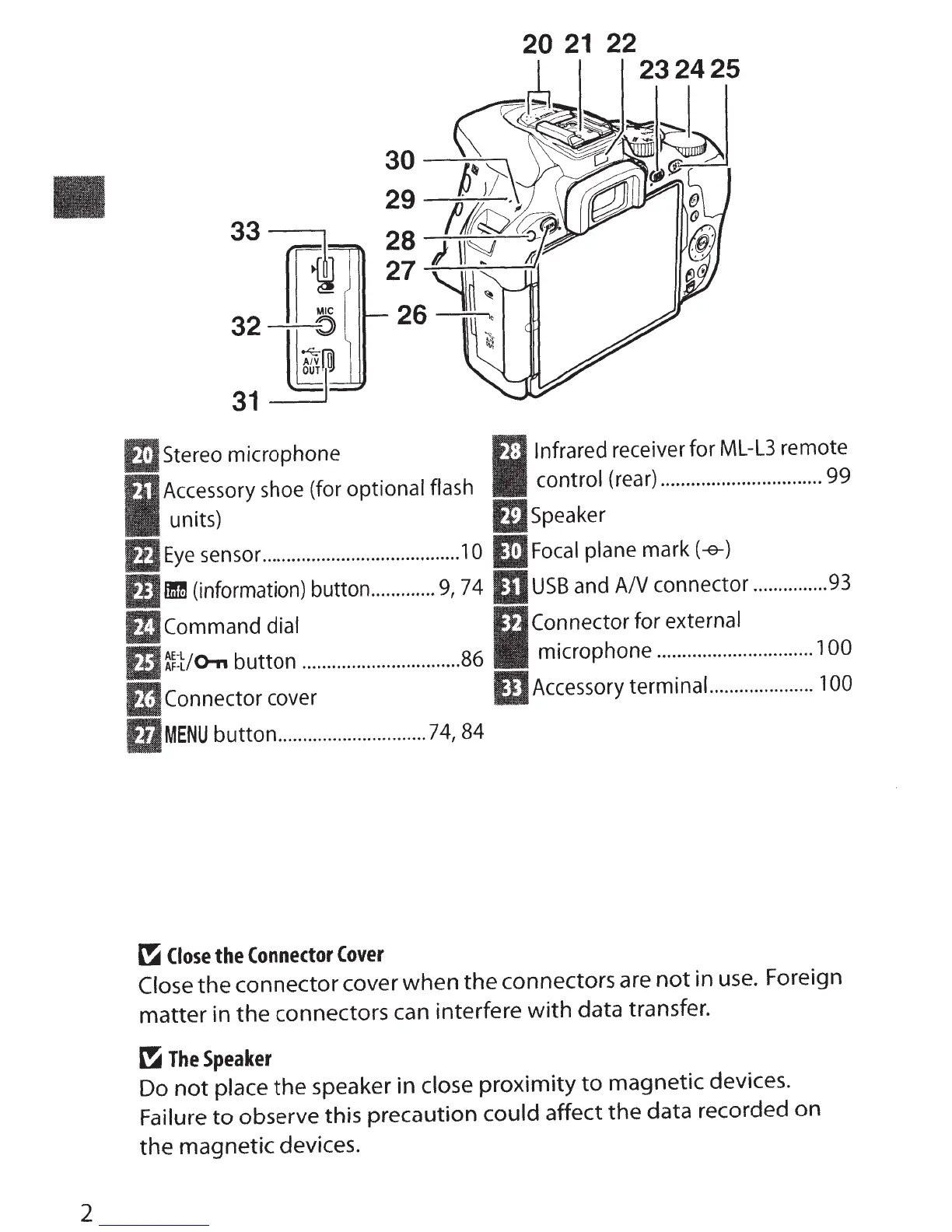
Stereo microphone
Accessory shoe (for optional flash
units)
Eye
sensor ........................................
1
0
ID
(information) button
.............
9,
7 4
Infrared receiver for ML-L3 remote
control (rear) ................................ 99
Speaker
Focal
plane mark
(-e-)
USB
and
AN
connector
...............
93
Command
dial Connector
for external
~:t;o-n
button
................................ 86 microphone ...............................
1
00
mconnector
cover
mAccessory
terminal.
....................
100
BJMENU
button
..........
.
...................
74,
84
~
Close
the
Connector
Cover
Close
the connector
cover
when the connectors are
not
in
use.
Foreign
matter in the connectors
can
interfere
with
data transfer.
~
The
Speaker
Do
not
place the speaker in
close
proximity
to
magnetic devices.
Failure
to
observe
this precaution could affect the data recorded on
the magnetic devices.



 To Next Page