EasyManua.ls Logo

Nikon D5500 - Page 39

Nikon D5500
583 pages
Print Icon
To Next Page IconTo Next Page
To Previous Page IconTo Previous Page
Loading...
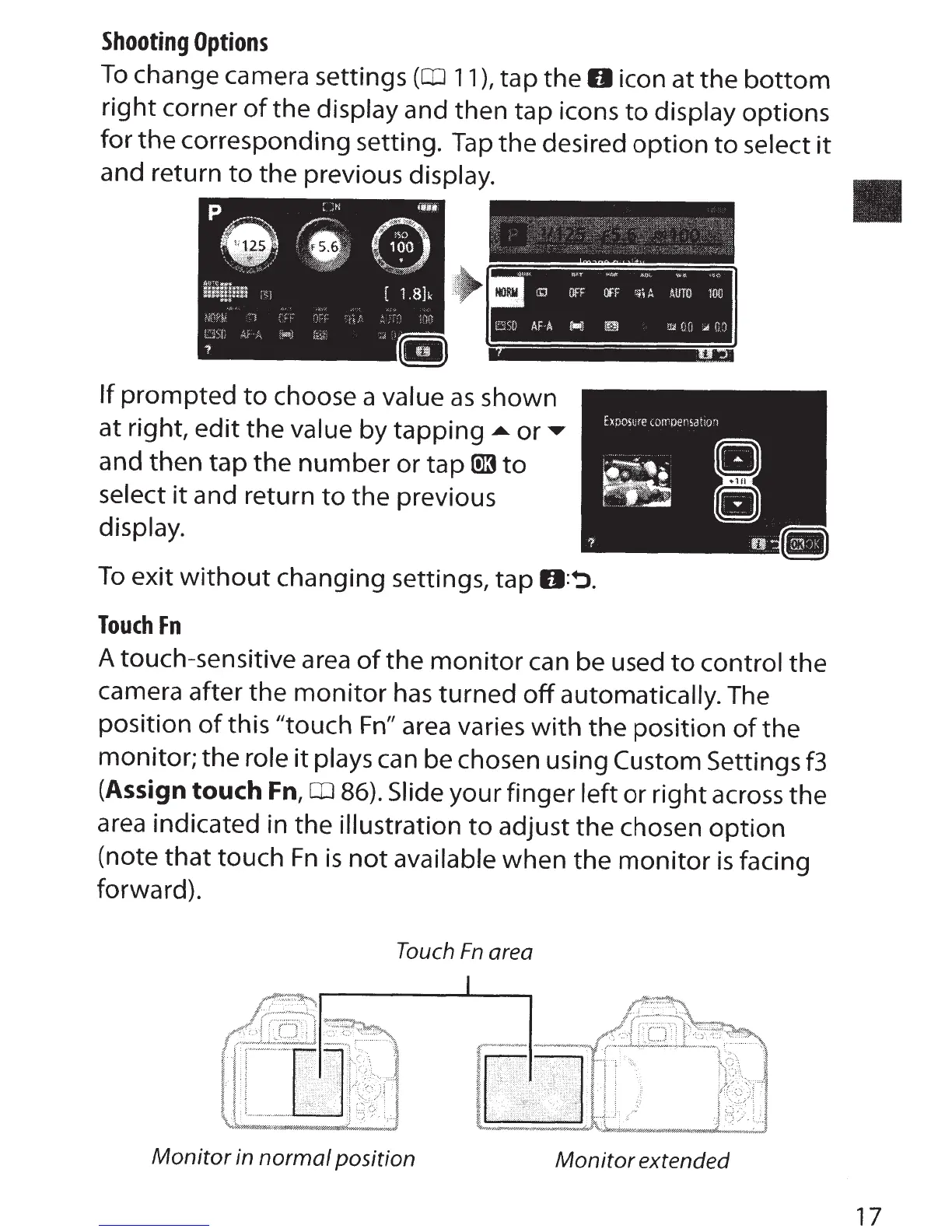
Shooting
Options
To
change camera settings
(CD
11
),
tap the
0
icon at the
bottom
right
corner
of
the
display and then tap icons
to
display options
for
the
corresponding setting.
Tap
the
desired
option
to
select
it
and return
to
the previous
display.
If
prompted
to
choose a value
as
shown
at right,
edit
the
value
by tapping
... or
and then tap
the
number
or
tap
ID3
to
select
it
and return
to
the
previous
display.
To
exit
without
changing settings, tap
O:~.
Touch
Fn
A touch-sensitive area
of
the
monitor
can be used
to
control
the
camera after the
monitor
has
turned
off
automatically. The
position
of
this "touch
Fn"
area varies
with
the
position
of
the
monitor; the
role
it
plays
can be chosen using
Custom
Settings
f3
(Assign
touch
Fn,
CD
86).
Slide your finger left or
right
across the
area
indicated in the
illustration
to
adjust
the
chosen
option
(note
that
touch
Fn
is
not
available
when the
monitor
is
facing
forward).
Touch
Fn
area
Monitor
in
normal
position
Monitor
extended
17

Table of Contents

Other manuals for Nikon D5500

Related product manuals