EasyManua.ls Logo

Nikon D5500 - Page 52

Nikon D5500
583 pages
Print Icon
To Next Page IconTo Next Page
To Previous Page IconTo Previous Page
Loading...
30
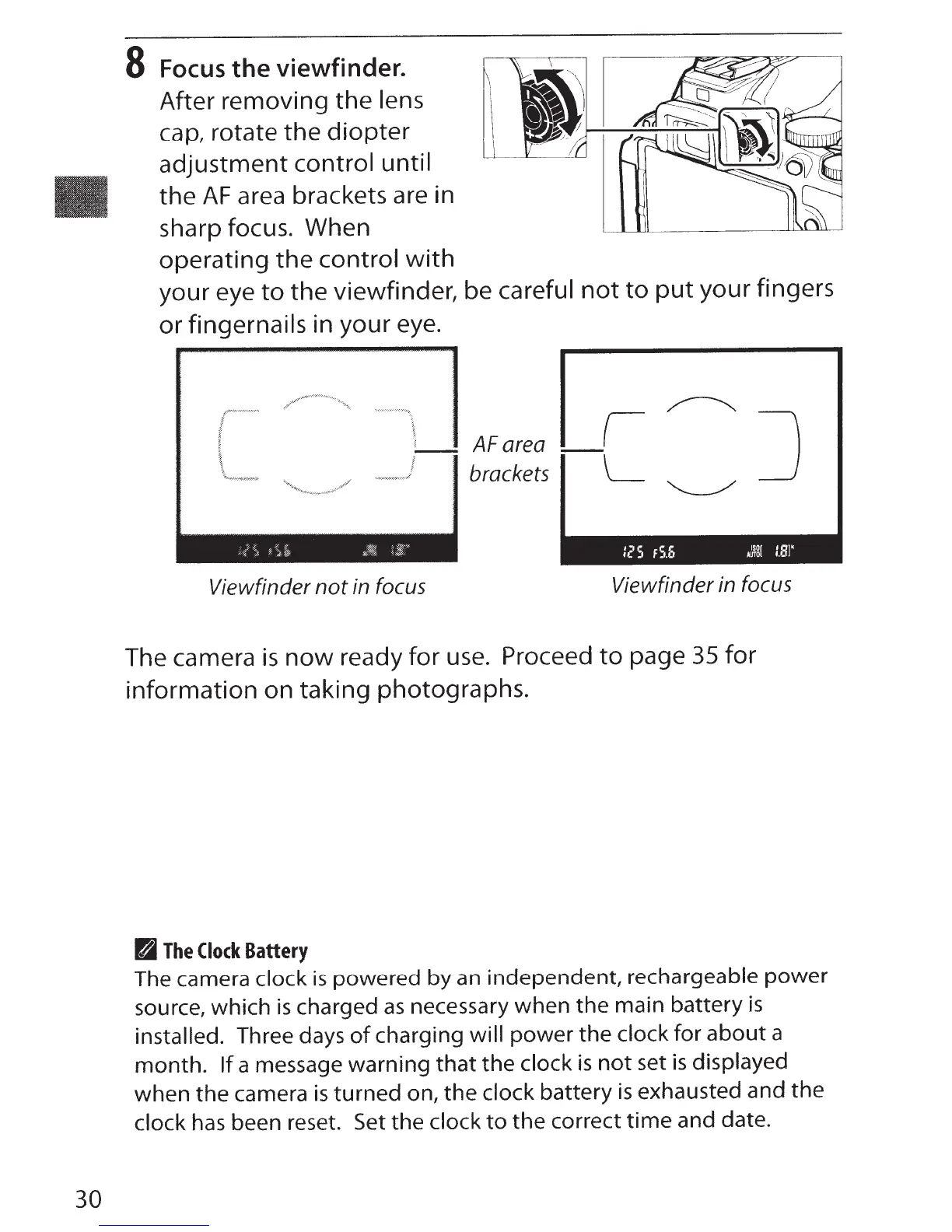
8
Focus
the
viewfinder.
After removing
the
lens
cap, rotate
the
diopter
adjustment
control until
the
AF
area brackets are in
sharp focus. When
operating
the
control
with
your eye
to
the
viewfinder, be
careful
not
to
put
your fingers
or
fingernails
in your eye.
1
;
'"~·~·-,;
Viewfinder
not
in focus
AF area
brackets
I
L
12
5
FS,S
A~g[
1.81'
Viewfinder in focus
The camera
is
now
ready for
use.
Proceed
to
page
35
for
information on taking photographs.
~
The
Clock
Battery
The camera clock
is
powered by
an
independent, rechargeable power
source, which
is
charged
as
necessary when the main battery
is
installed. Three days
of
charging
will power the
clock for
about
a
month.
If
a message warning
that
the
clock
is
not
set
is
displayed
when the camera
is
turned
on, the
clock
battery
is
exhausted and the
clock
has
been reset. Set the
clock
to
the correct
time
and date.

Table of Contents

Other manuals for Nikon D5500

Related product manuals