EasyManua.ls Logo

Nikon D5500 - Page 96

Nikon D5500
583 pages
Print Icon
To Next Page IconTo Next Page
To Previous Page IconTo Previous Page
Loading...
74
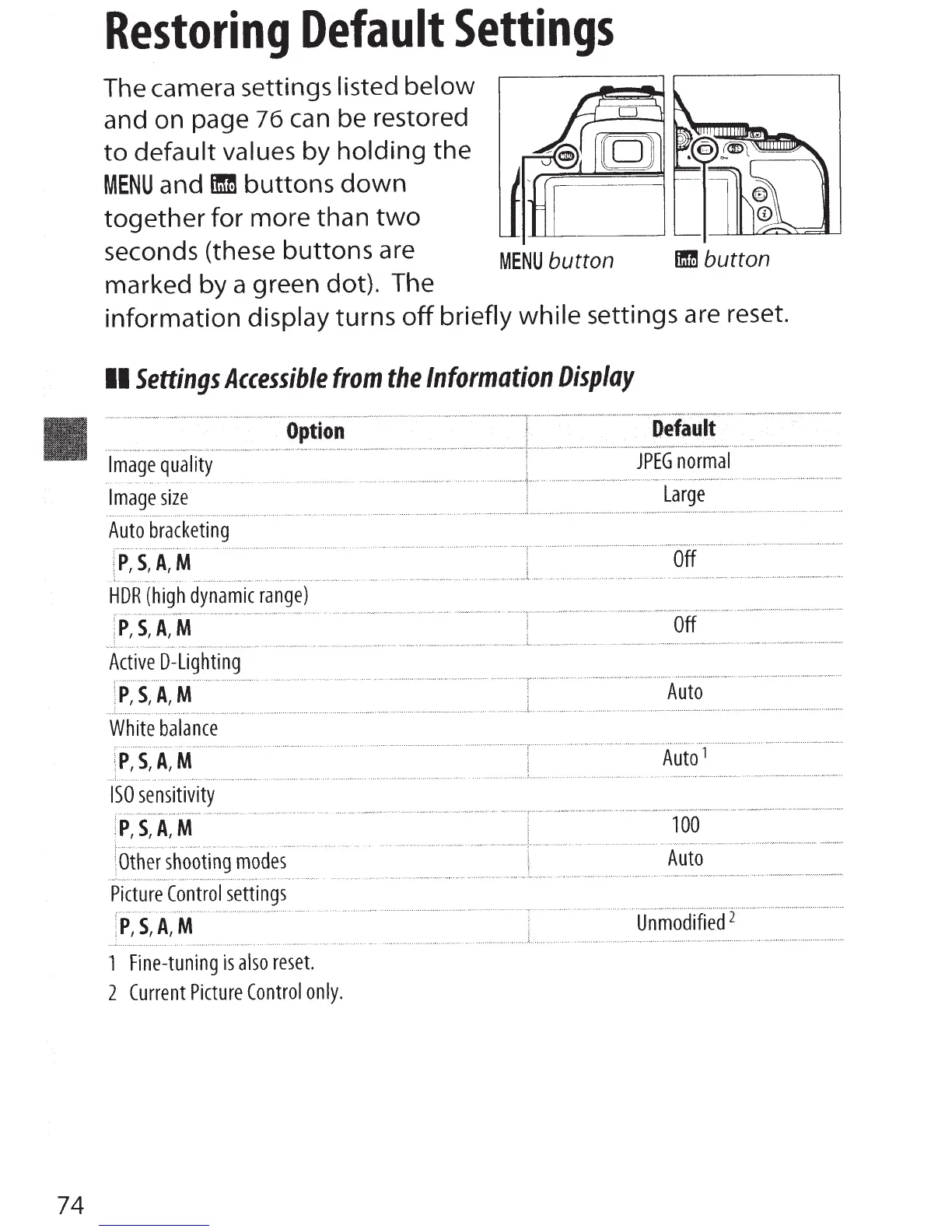
Restoring
Default
Settings
The camera settings listed
below
and on page
76
can be restored
to
default values
by
holding
the
MENU
and
fmm
buttons
down
together
for more than
two
seconds (these
buttons
are
marked by a green dot). The
MENU
button
lflm
button
information display turns
off
briefly
while
settings are reset.
II
Settings
Accessible
from
the
Information
Display
Image
quality
Image
size
Auto
bracketing
P,S,A,M
.--.
.
..
.,
...
.
...
' "
"'
·""
Option
HDR
(high
dynamic
range)
P,S,A,M
Active
D-Lighting
P,S,A,M
D·efault
JPEG
normal
Large
Off
Off
Auto
White
balance
P,S,A,M
.........
.....
.............
.
............
..................
.......
........
............
....
.
..
T
.............................
.,
........
.......................................................................
.
Auto
1
100
Auto
Unmodified
1
Fine-tuning
is
also
reset.
2
Current
Picture
Control
only.

Table of Contents

Other manuals for Nikon D5500

Related product manuals