Chapter 1 n Quick Setup Guide 3
multi selector to scroll down to the Setup menu (it’s marked with a wrench
icon), press the multi selector button to the right, and then press the down
button to scroll down to Time Zone and Date, and press the right button
again. The options for setting the 24-hour clock will appear on the screen that
appears next.
Mounting the Lens
If your D7200 has no lens attached, you’ll need to mount one before
shooting:
1. Select the lens and loosen (but do not remove) the rear lens cap.
2. Remove the body cap on the camera by rotating the cap away from the
shutter release button.
3. Once the body cap has been removed, remove the rear lens cap from the
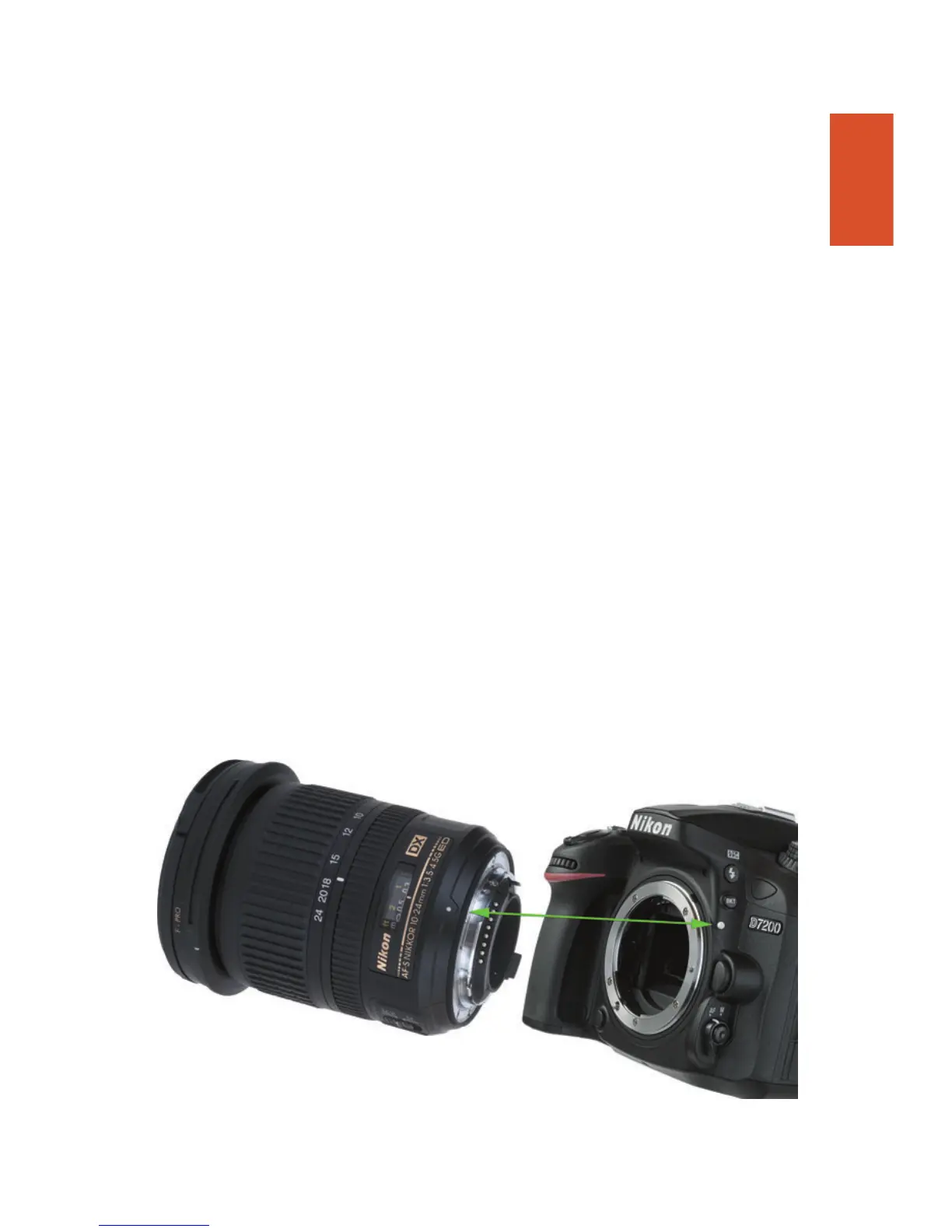
lens, set it aside, and then mount the lens on the camera by matching the
alignment indicator on the lens barrel with the white bump on the cam-
era’s lens mount (see Figure 1.3). Rotate the lens toward the shutter release
until it seats securely.
4. Set the focus mode switch on the lens to AF or M/A (Autofocus). If the
lens hood is bayoneted on the lens in the reversed position, twist it off and
remount with the “petals” (if present) facing outward. A lens hood pro-
tects the front of the lens from accidental bumps, and reduces flare caused
by extraneous light arriving at the front of the lens from outside the pic-
ture area.
Figure 1.3 Match the indicator on the lens with the white dot on the camera mount
to properly align the lens with the bayonet mount.



 To Next Page