David Busch’s Compact Field Guide for the Nikon D72006
D7200’s features, because they allow you to specify how the camera chooses its
settings when making an exposure, for greater creative control.
The auto modes and scene modes take full control of the camera, make all the
decisions for you, and don’t allow you to override the D7200’s settings. They
are most useful while you’re learning to use the camera, because you can select
an appropriate auto or scene mode (Auto, Auto/No Flash, Portrait, Landscape,
Child, Sports, Close Up, Night Portrait, or another scene mode listed next)
and fire away. You’ll end up with decent photos using appropriate settings, but
your opportunities to use a little creativity (say, to overexpose an image to cre-
ate a silhouette, or to deliberately use a slow shutter speed to add a little blur to
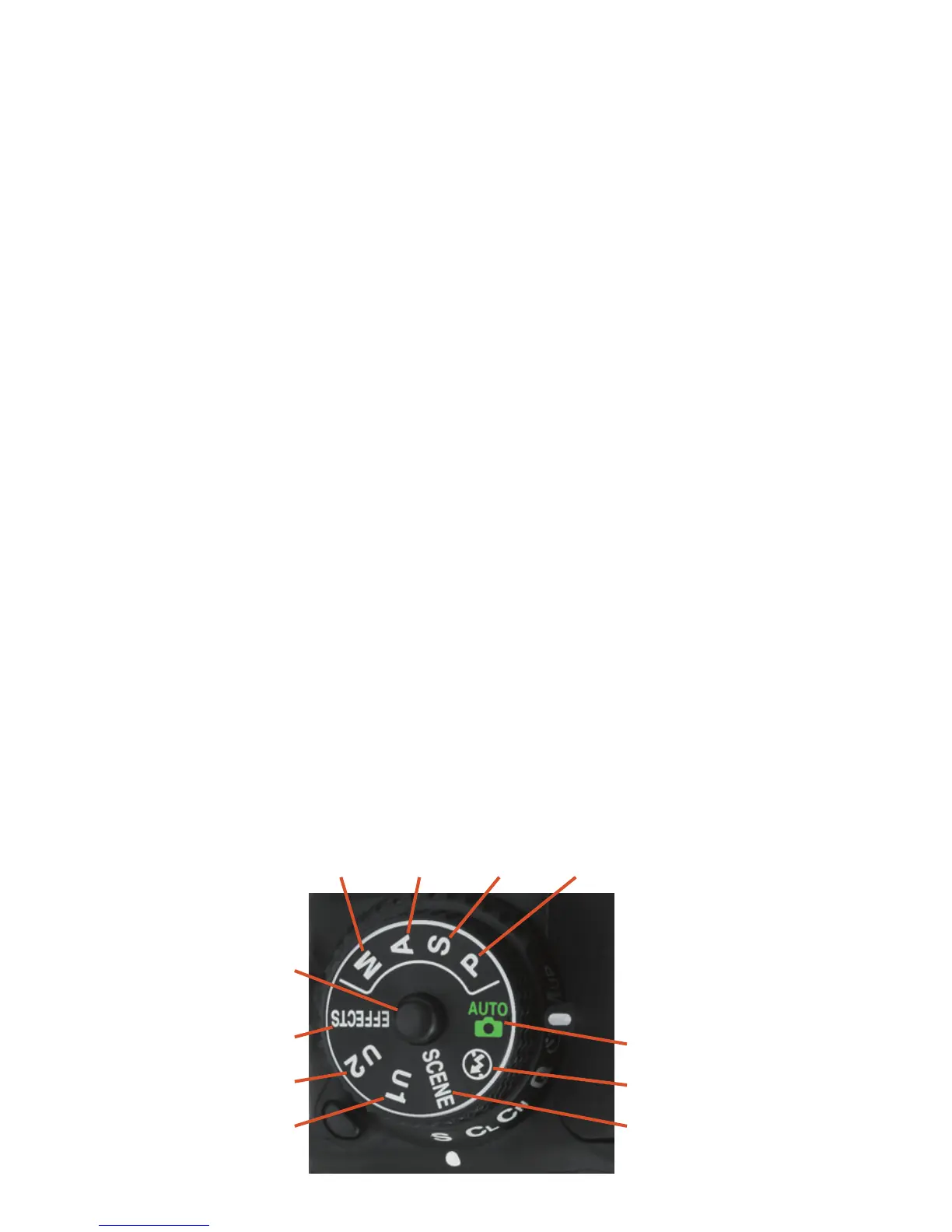
an action shot) are minimal. First, here’s a list of the advanced modes, which
you can choose by rotating the mode dial (shown in Figure 1.7):
n P (Program). This mode allows the D7200 to select the basic exposure
settings, but you can still override the camera’s choices to fine-tune your
image, while maintaining metered exposure.
n S (Shutter-priority). This mode is useful when you want to use a particu-
lar shutter speed to stop action or produce creative blur effects. Choose
your preferred shutter speed, and the D7200 will select the appropriate
f/stop for you.
n A (Aperture-priority). Choose when you want to use a particular lens
opening, especially to control sharpness or how much of your image is in
focus. Specify the f/stop you want, and the D7200 will select the appro-
priate shutter speed for you.
n M (Manual). Select when you want full control over the shutter speed
and lens opening, either for creative effects or because you are using a
studio flash or other flash unit not compatible with the D7200’s auto-
matic flash metering.
Figure 1.7
Rotate the mode dial
to select the expo-
sure mode you want.
Program
Shutter-
priority
Aperture-
priority
Manual
Effects modes
Mode dial
release button
User 2
User 1
Auto
Auto (Flash Off)
Scene modes



 To Next Page