14
En
Fr
15
En
Fr
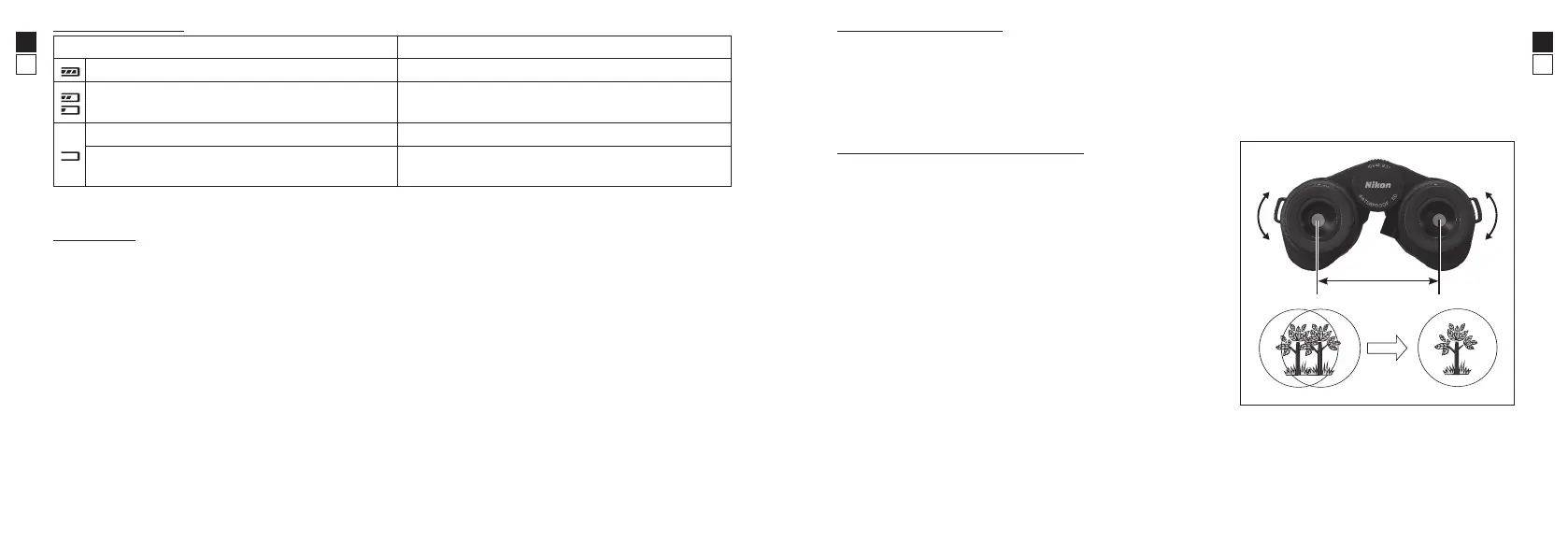
Battery condition
Display Description
After power on, displays for 2 seconds only. Sufficient power available.
After power on, displays for 2 seconds only.
Power getting low.
Prepare to replace the battery.
Displayed normally Low. Battery should be replaced with a new one.
Blinks
After blinking 3 times, automatically powers off.
The battery is empty.
Replace the battery.
Battery life
Approx. 4,000 times (at approx. 20°C/68°F)
Use this number of measurements as a reference because it changes depending on the environment such as
temperature and other factors.
* The battery supplied with this product is for operation checking. Due to natural electrical discharge, the life of this battery
will likely be shorter than that noted above.
* If water enters the battery chamber due to submersion, dry the battery chamber well, then replace the battery.
Adjusting the eyecups
• For eyeglass wearers, use fully retracted. If your view is secured, you can also use the two intermediate
click stops.
• For non-eyeglass wearers, use fully extended. If your view is secured, you can also use the two
intermediate click stops.
* For directions in which to turn the eyecups, please refer to the image on page 11.
Adjusting interpupillary distance
While looking at a subject through the eyepieces, gently rotate
the product body until the two images of the subject become
one as in (A).
* Take care not to get your fingers pinched when adjusting the
interpupillary distance.
A




 To Next Page