20
En
Fr
21
En
Fr
Measurement
Caution — Controls, adjustments or usage of procedures other than those specified herein may
produce negative effects or damage to your health due to laser radiation.
1. Turn on the power.
• Press the PWR button to turn on the power.
• If you do not operate the button for about 8 seconds, the power turns off automatically.
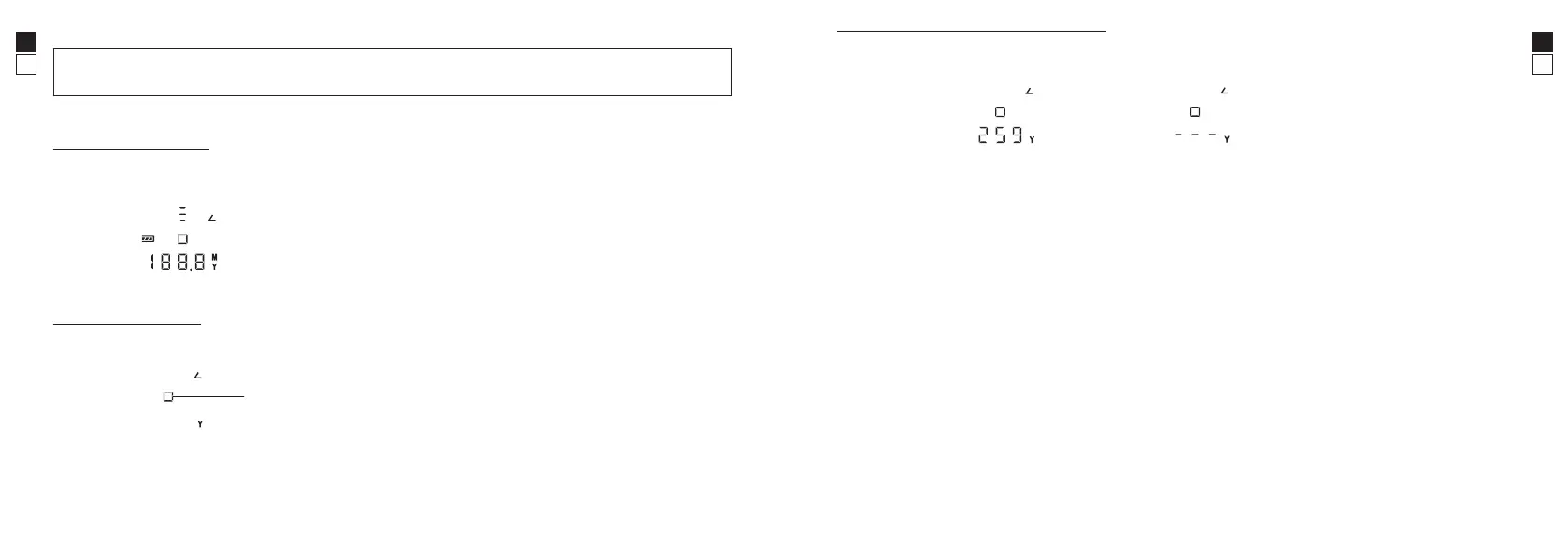
Immediately after power-on
2. Aim at the target.
Position the target mark on the target whose distance you want to measure.
Standby
target mark
3. Press the PWR button to measure.
• After measurement, the result is displayed for approx. 8 seconds, then power automatically turns off.
• Press the PWR button while the power is on to measure again.
Example of the
measurement result display
Example of
measurement failure
* Continuous measurement function
Press and hold the PWR button to start continuous measurement up to approx. 8 seconds. During
measurement, the measured result is displayed consecutively while the laser irradiation mark is blinking.
If you release your finger from the button, continuous measurement stops.
Items supplied
• Eyepiece cap ×1 • Objective lens cap ×2 • Soft case ×1
• Neck strap ×1 • Lithium battery (CR2) ×1




 To Next Page