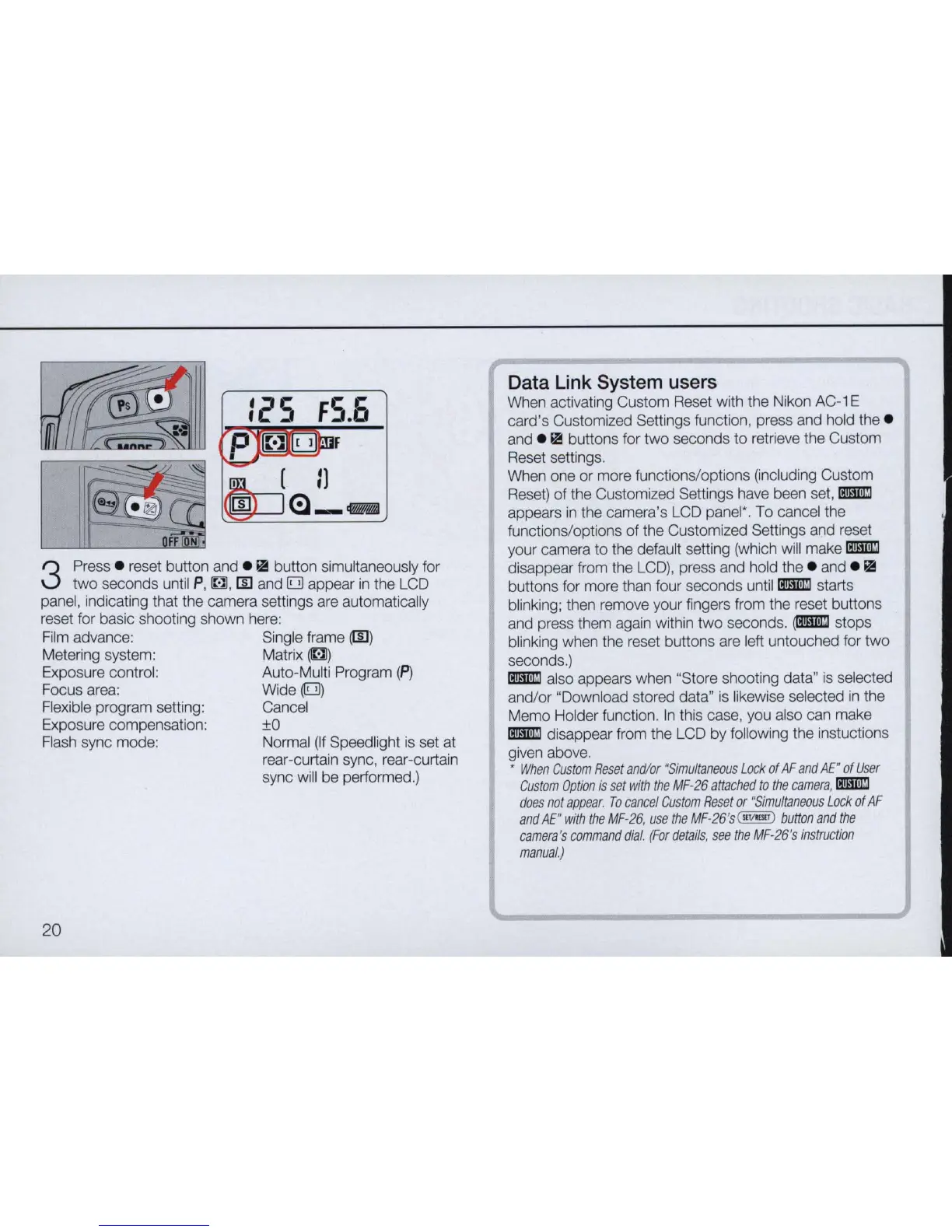
3
Press . reset button and .
ill
button simultaneously for
two seconds until
P,
~
,
[[]
and 0 appear
in
the
LCD
panel, indicating that the camera settings are automatically
reset for basic shooting shown
here:
Film
advance: Single frame
(IIJ
)
Metering system:
Matrix~)
Exposure control: Auto-Multi Program
(p)
Focus area: Wide
(E!l)
Flexible program setting: Cancel
Exposure compensation:
±O
Flash
sync mode: Normal
(If
Speed light
is
set at
rear-curtain sync, rear-curtain
sync
will
be
performed.)
20
Data Link System users
When activating Custom Reset with the Nikon
AC-1
E
card's Customized Settings function, press and hold the .
and .
ill
buttons for two seconds to retrieve the Custom
Reset settings.
When one or more functions/options (including Custom
Reset)
of the Customized Settings have been
set,
[mmJ
appears
in
the camera's LCD panel'. To cancel the
functions/options of the Customized Settings and reset
your camera to the default setting (which will make
[mmJ
disappear from the
LCD),
press and hold the . and .
ill
buttons for more than four seconds until [mmJ starts
blinking; then remove your fingers from the reset buttons
and press them again within two seconds.
(tmml
stops
blinking when the reset buttons are left untouched for two
seconds.)
[mmJ also appears when "Store shooting data"
is
selected
and/or "Download stored data"
is
likewise selected
in
the
Memo Holder function.
In
this case, you also can make
[mmJ disappear from the
LCD
by following the instuctions
given above.
•
When
Custom
Reset
and/or
"Si
multaneous
Lock
of
AF
and
AE"
of
User
Custom
Option
is
set
with
the
MF-26
attached
to
the
camera
, [mmJ
does
not
appear
.
To
cancel
Custom
Reset
or
"
Simultaneous
Lock
of
AF
and
AE"
with
the
MF
-
26
,
use
the
MF-26
's(
IlTImrT
J
button
and
the
camera
's
command
dial
.
(For
details
,
see
the
MF
-
26
's
instruction
manual.)



 To Next Page