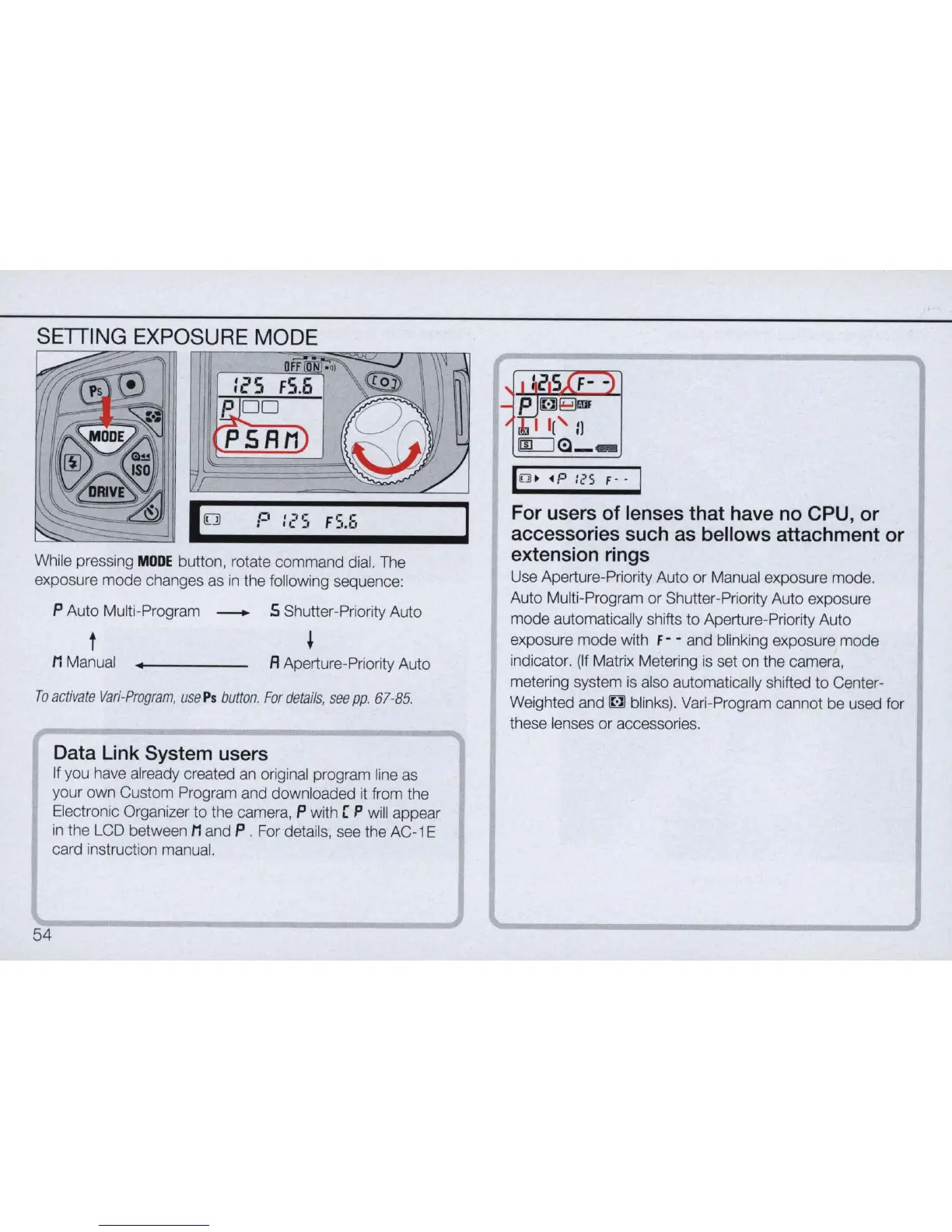
SETTING EXPOSURE MODE
mH----~~~T/In~
1
0
P
1,'5
FS.E.
While pressing
MODE
button, rotate command dial. The
exposure
mode
changes as
in
the following sequence:
P Auto Multi-Program _ 5 Shutter-Priority Auto
t
,
M Manual fl Aperture-Priority Auto
To
activate
Vari-Program,
use
Ps
button
.
For
details
,
see
pp.
67
-
85.
Data Link System users
If you have already created
an
original program line as
your own Custom Program and downloaded
it
from the
Electronic Organizer to the camera, P with [
P will appear
in
the LCD between M and P . For details, see the AC-1 E
card instruction manual.
54
10 .• p :(,5 F
--
For users of lenses that have no CPU, or
accessories such as bellows attachment or
extension rings
Use Aperture-Priority Auto or Manual exposure mode.
Auto Multi-Program or Shutter-Priority Auto exposure
mode automatically shifts
to
Aperture-Priority Auto
exposure mode with
f - - and blinking exposure mode
indicator.
(If
Matrix Metering
is
set on the camera,
metering system
is
also automatically shifted
to
Center-
Weighted and
~
blinks). Vari-Program cannot be used for
these lenses or accessories.



 To Next Page