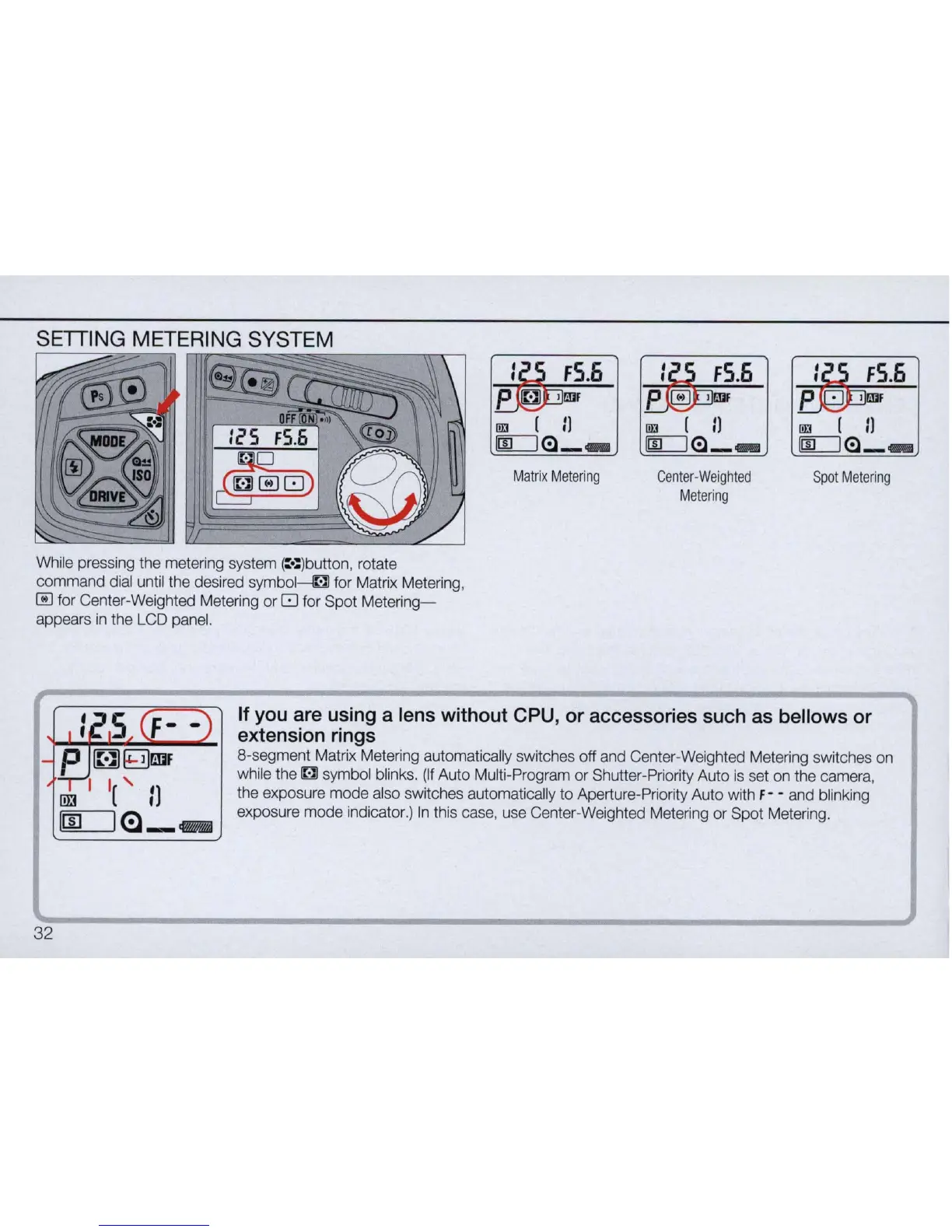
SETIING METERING SYSTEM
I!II (
II
m=:J(:l _ _
Matrix
Metering
fS.6
Center-Weighted
Metering
"iBP
fS
.
6
P:;
WF
I!II (
II
m:::::::J
(:l _ _
Spot
Metering
While pressing the metering system (:
':
)button
, rotate
command dial until the desired symbol----G for Matrix Metering,
~
for Center-Weighted Metering
or
8 for Spot
Metering-
appears
in
the LCD panel.
32
If you are using a lens without CPU, or accessories such as bellows or
extension rings
8-segment Matrix Metering automatically switches off and Center-Weighted Metering switches on
while the
~
symbol blinks.
(If
Auto Multi-Program
or
Shutter-Priority Auto is set on the camera,
the exposure
mode
also switches automatically
to
Aperture-Priority Auto with F - - and blinking
exposure
mode
indicator.)
In
this case, use Center-Weighted Metering
or
Spot Metering.



 To Next Page