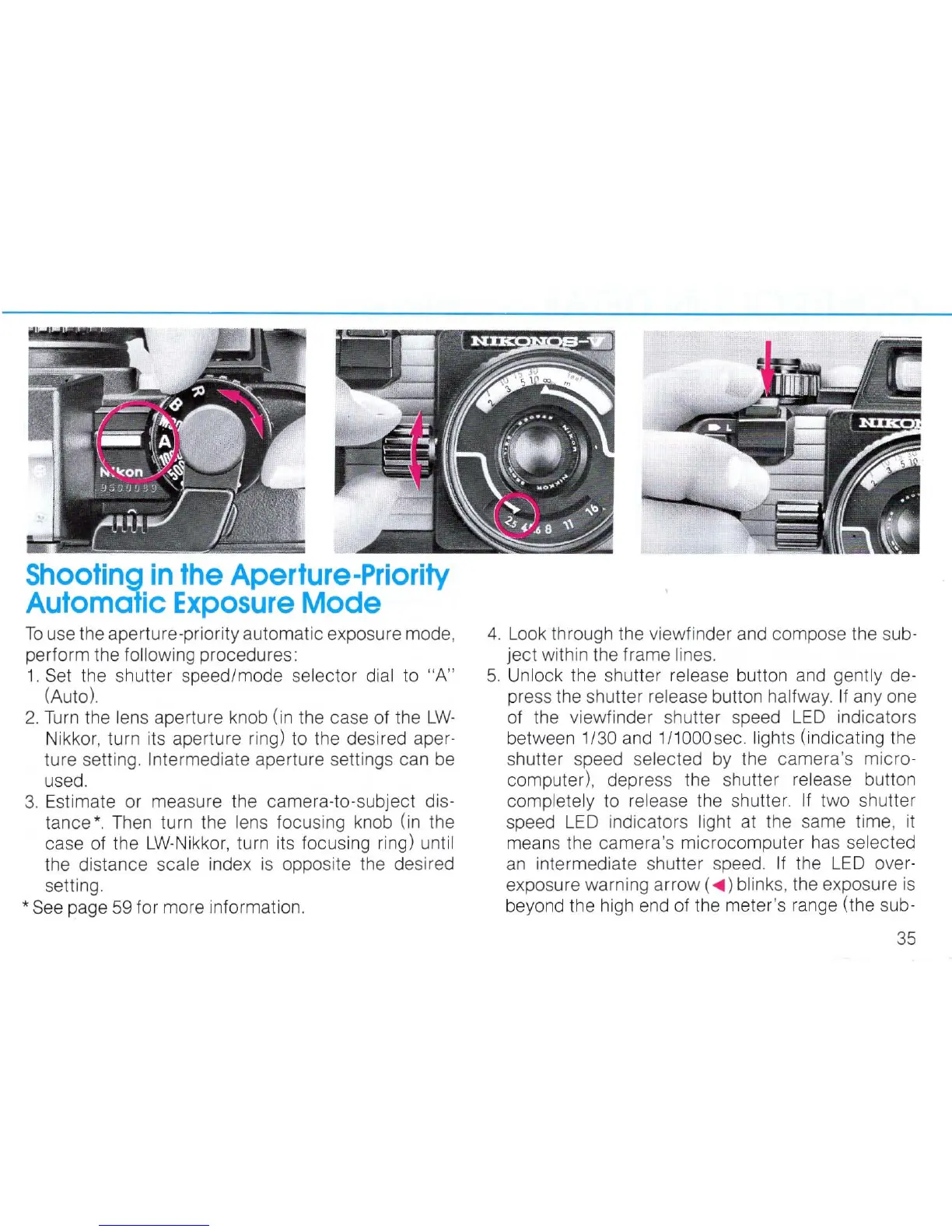
Shooting
in
the
Aperture-Priority
Automalic
Exposure
Mode
To
use the aperture-priority automatic exposure mode,
perform the following procedures:
1.
Se
t the shutter speed/mode selector dial
to
"A"
(Auto)
2.
Tu
rn
the lens aperture knob (in the case of the
LW-
Nikkor, turn its aperture ring)
to
the desired aper-
ture setting.
Intermediate aperture settings can
be
used.
3.
Estimate or measure the camera-to-subject dis-
tance
*.
T
hen
turn the
le
ns
focusing knob (in the
case of the
LW
-Nikkor, turn its focusing ring) until
the distance scale index
is
opposite the desired
setting.
*
See
page
59
for more information.
4.
Look through the viewfinder and compose the sub-
ject with
in
the frame lines.
5.
Unlock the shutter release button and gently de-
press the shutter
release button halfway. If anyone
of the viewfinder shutter speed
LED
indicators
between
1/30 and 1/1000sec. lights (indicating the
shutter speed selected
by
the camera's micro-
computer), depress the shutter
release button
completely to release the shutter. If two shutter
speed L
ED
indicators light at the same time,
it
means the camera's microcomputer has selected
an
intermediate shutter speed. If the
LED
over-
exposure warning arrow (
...
) blinks, the exposure is
beyond the high end of the meter's range (the sub -
35



 To Next Page