EasyManua.ls Logo

Nikon PRONEA S - Page 17

Nikon PRONEA S
44 pages
Print Icon
To Next Page IconTo Next Page
To Previous Page IconTo Previous Page
Loading...
Install
Batteries
and Check Battery
Power
1
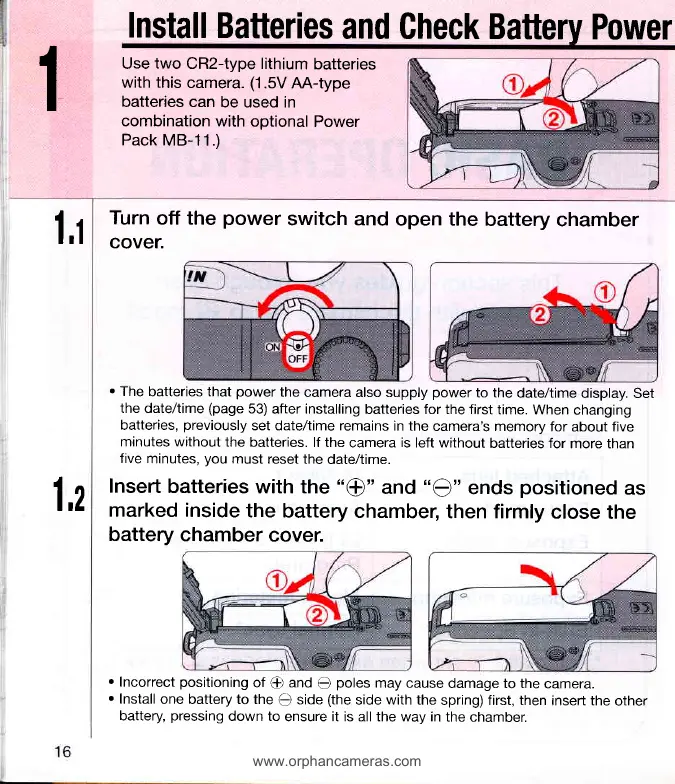
Use
two
CR2-type lithium
batteries
with this
camera.
(1.5V
AA-type
batteries can
be used in
combination
with optional
Power
Pack
MB-11.)
1,1
Turn
off the
power
switch and
open the
battery
chamber
cover.
.
The
batteries that
power
the
camera also supply
power
to the
date/time
display. Set
the date/time
(page
53) after installing
batteries for the first
time. When
changing
batteries,
previously
set date/time remains
in the
camera's memory
for
about
five
minutes without
the batteries.
lf the
camera
is
left without
batteries for
more than
five
minutes,
you
must
reset the
date/time.
Insert
batteries
with the "@"
and
"Q"
ends
positioned
as
marked inside
the
battery chambel
then firmly
close
the
battery
chamber
coven
r
Incorrect
positioning
of
@
and
Q
poles
may cause
damage to the
camera.
r
Install
one battery to the
O
side
(the
side with the
spring) first, then
insert the
other
battery,
pressing
down to
ensure it is all the way in
the chamber.
1,2
www.orphancameras.com