12 13
En
Fr
Pt
Es
En
Fr
Pt
Es
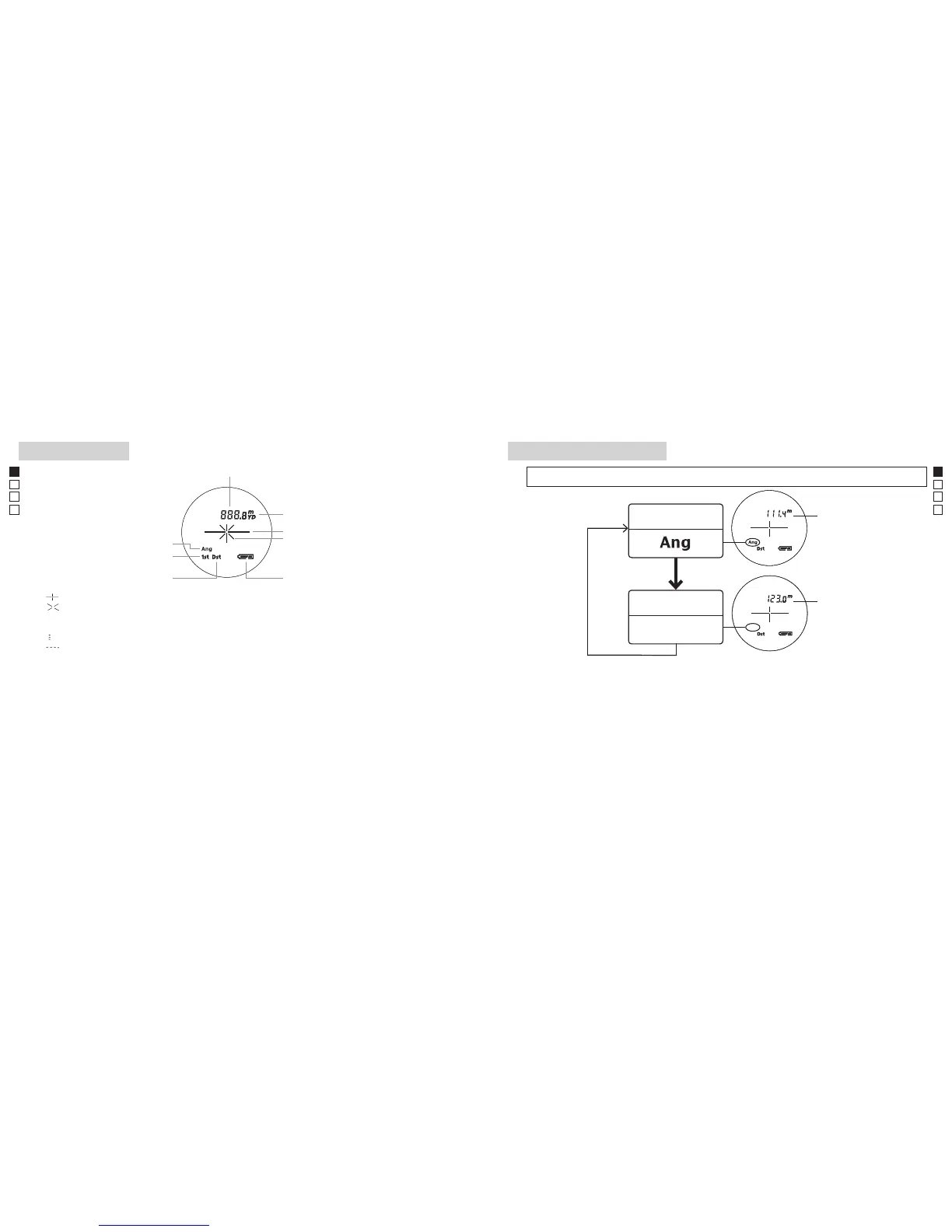
Internal display Measurement display mode
1. Turn on the power (Confirm the internal display is on).
2.PressandholdtheMODEbutton,thenimmediately(lessthan0.5second)depress
thePOWERON/Measurementbuttonforlessthan2seconds.
3. Release your finger from the POWERON/Measurement button to switch the
Measurement display mode.
*
If the buttons are not pressed in the correct order, switching will not take place.
*
Switching the mode after measurement converts the results to the new mode.
*
After the mode is set, measurements are performed in the new mode.
PressandholdtheMODEbutton,thenimmediatelydepressthePOWERON/Measurementbutton(less
than 2 seconds) to change the mode in the order shown below.
『 』 - Aim at the target you want to measure. Position the target at the center of the reticle.
『 』 - Appears while the laser is being irradiated for a measurement.
Remains present during single measurement. Blinks during continuous measurements.
Do not look into the objective lens while this mark is shown.
『
』 - Now measuring
『
』 - "Failure to measure" or "Unable to measure"
*Usually,anLCDemploysequalorlowermagnification.HowevertheLCDofthisproductismagnified
by the high magnification of the eyepiece. Although this LCD was produced using the most advanced
technology, it is impossible to eliminate dust completely. As a result, dust may be seen. It will not,
however, affect measurement accuracy or safety during use.
Distance
Unitofmeasure(m/yd.)
Target mark
Laser irradiation mark
Battery condition
First Target Priority mode
Distant Target Priority mode
HorizontalDistancedisplaymode
HorizontalDistance
Horizontal Distance
Mode
Actual Distance
Actual Distance
Mode



 To Next Page