For more information on setting your wireless Speedlights please see your instruction manual.
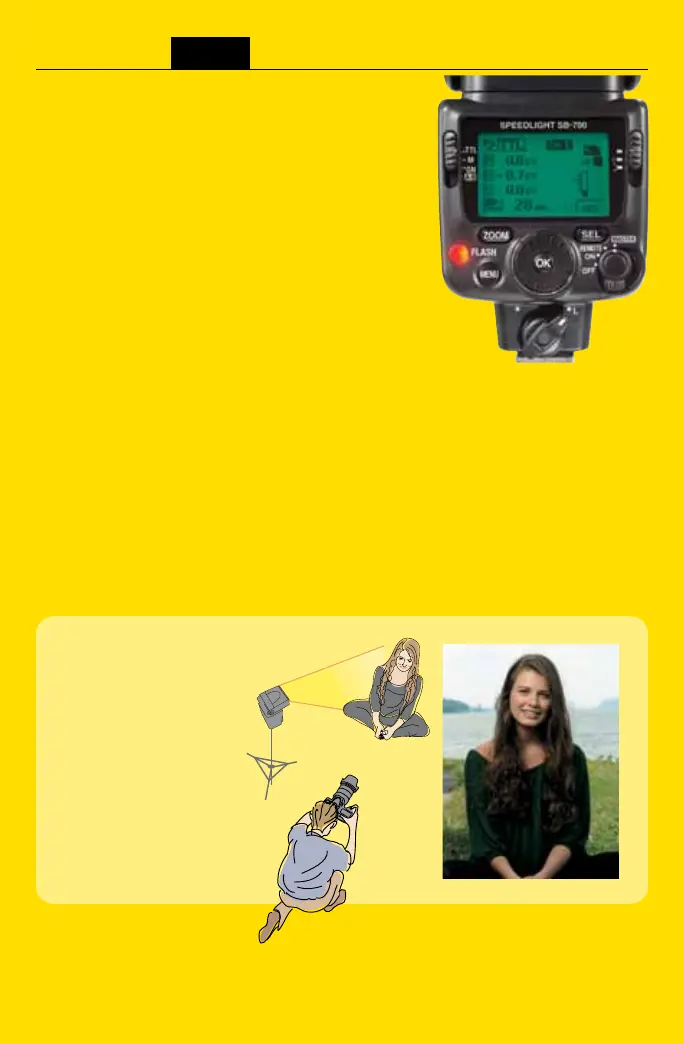
Setting the SB-700 as a Master Speedlight Unit
Set the SB-700 to the Master mode by using the
Off/On/Remote/Master wireless setting switch.
1. Turn the Off/On/Remote/Master switch while
holding down the button in the center.
2. Align the index of the Off/On/Remote/Master
setting switch to MASTER.
Setting the flash mode, flash output level compensation values, and channel
number on the Master flash unit.
[Setting i-TTL mode and channel 1 (example)]
1. Set the mode selector to [TTL].
2. Press the [SEL] button to select the Master (M) flash unit
choose a flash compensation value with the selector dial,
and then press the [OK] button.
Rotating the Selector Dial allows for flash compensation settings
from +3 EV to -3 EV or --- (No light output (although in M - - - a pre-flash will occur)
3. Press the [SEL] button until the Remote Group A or
Remote Group B flash unit is highlighted, then choose
a flash compensation value with the selector dial,
and then press the [OK] button.
4. After setting the output compensation value of the master
and Remote Groups, press [SEL] to highlight the ”Ch”
and set the Channel that you would like to use by
rotating the Selector Dial (Channels 1-4) and then press the [OK] button
SEE WHAT JUST
ONE SPEEDLIGHT
CAN DO.
Position one Speedlight
off camera for flattering
fill-flash portraits.



 To Next Page