II Operations
1 Getting started (Emitting the laser)
- 22 -
1 Getting started (Emitting the laser)
1
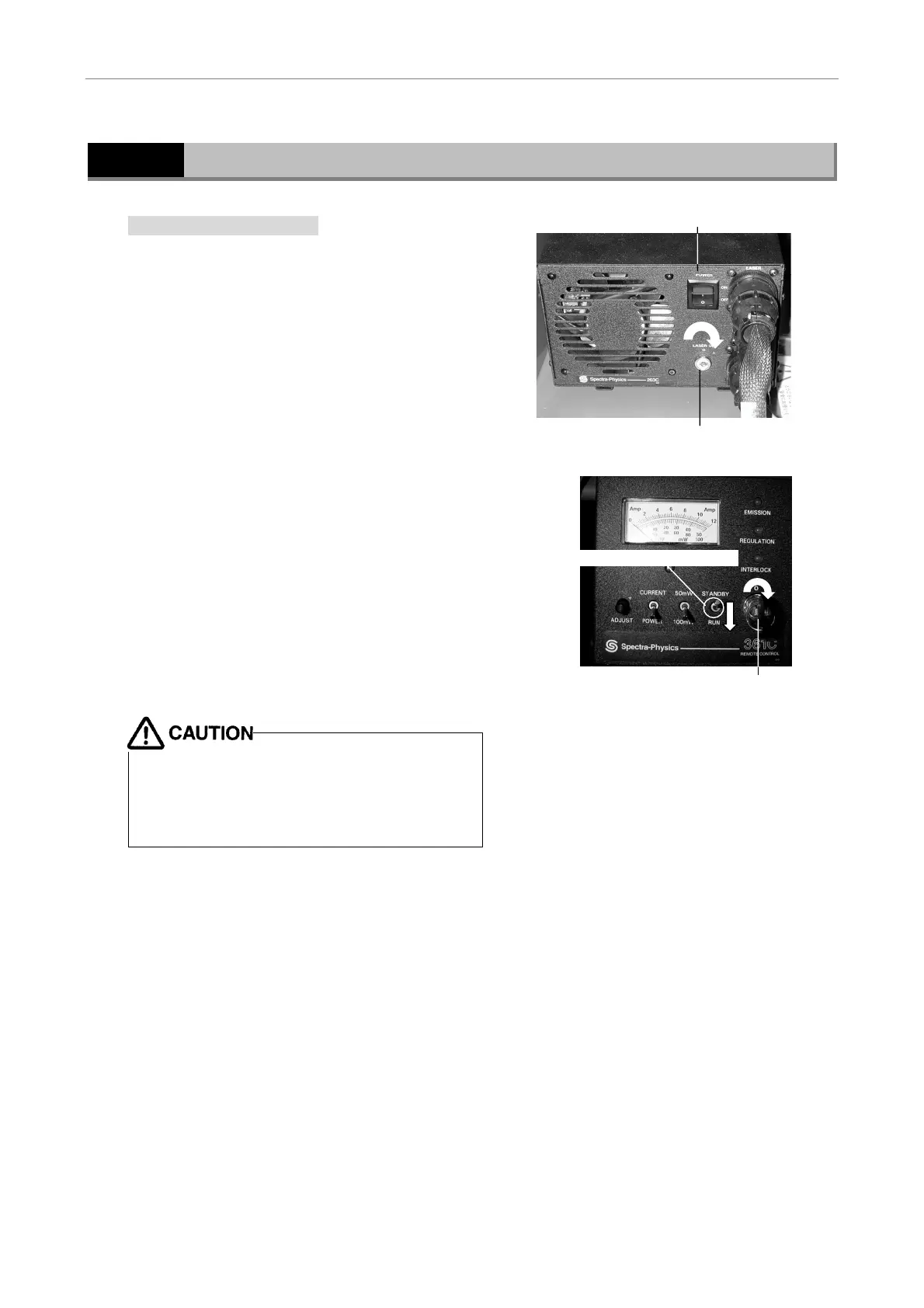
Emitting the argon laser
1 Switch on the power switch and turn the key
switch clockwise on the argon laser power
unit to turn on the unit.
Argon laser power unit
2 Turn the key switch clockwise on the argon
laser remote controller to turn on the
controller.
At this time, make sure that Run mode is
selected. Three lamps on the remote
controller will light green in approximately
one minute. Laser output will stabilize in
approximately 15 minutes.
Argon laser remote controller
• Be sure to read the Instruction Manual supplied
with the air-cooled argon laser.
• Always select Run mode when using the argon
laser. Image quality may be degraded if Run
mode is not selected.
(2) Turn the key switch clockwise
(1) Switch on the power switch
(2) Run mode is selected
(1) Turn the key switch clockwise












 To Next Page