V Troubleshooting
- 33 -
V
V
Troubleshooting
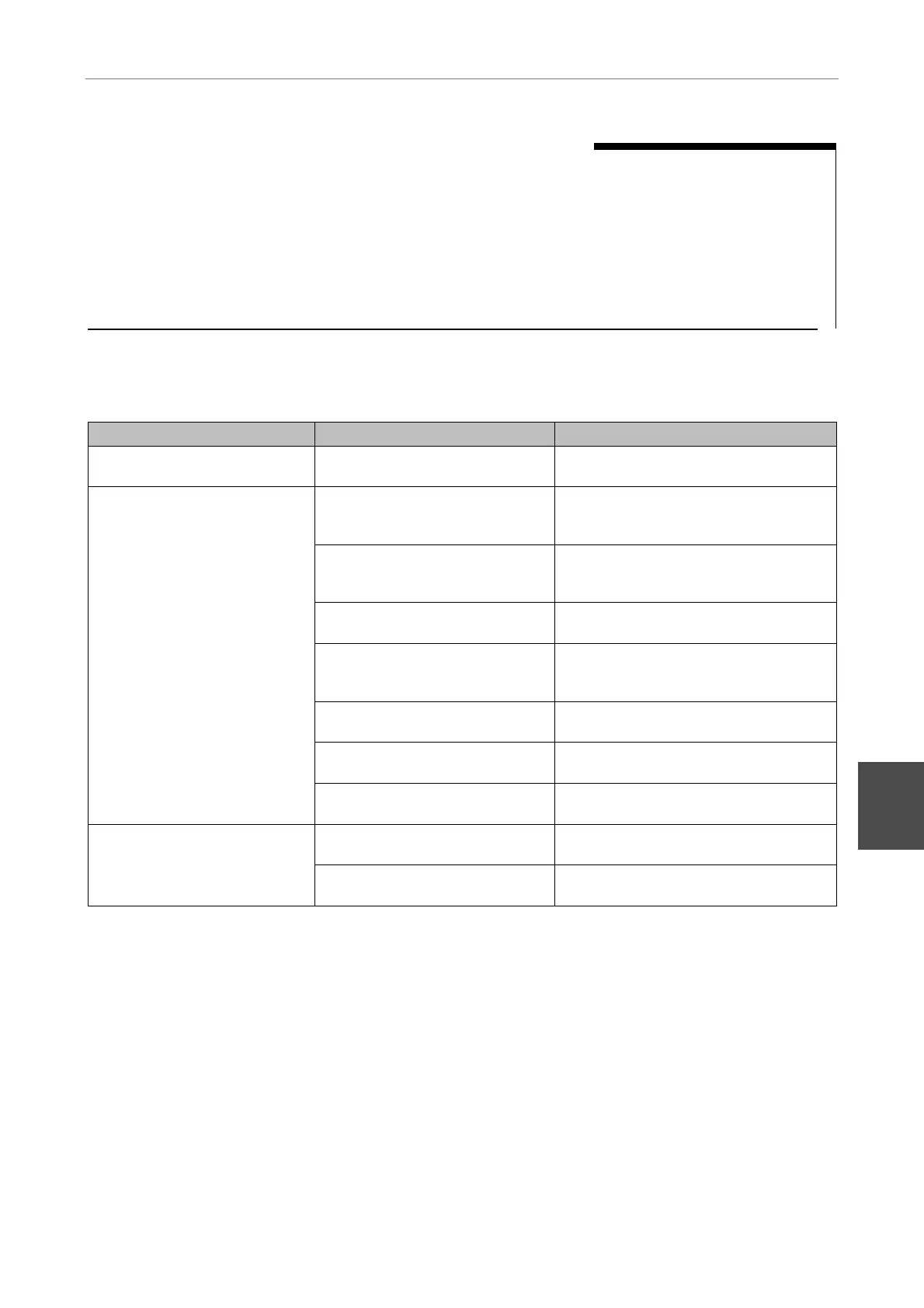
Problem Cause Remedy
Unable to turn on system
power
The power cable is not
connected to the outlet.
Connect the power cable to the outlet.
The laser is not on.
Turn on the laser in accordance with
the steps described in "1. Getting
started" under "II Operations."
The motorized shutter of the
laser unit is closed.
Close the eyepiece shutter and use the
shutter switch of the shutter control unit
to open the motorized shutter.
The microscope's optical path is
not set to the TV camera port.
Switch the optical path to the TV
camera port.
Inappropriate filters (dichroic
mirror and absorption filter) and
laser wavelength setting.
Use filters and wavelength appropriate
for the fluorescence reagent used.
Excessively low laser power.
Adjust the ND filters of the laser unit
and the TIRF attachment.
Epi-fl attachment's filter block in
optical path.
Remove the filter block from the optical
path.
Dark TIRF image
Laser beam focal point is not on
the objective's pupil.
Adjust the laser position.
Laser beam focal point is near
the center of the objective's pupil.
Adjust the laser position.
TIRF image with poor contrast
The laser beam emitted by the
objective is not a parallel ray.
Adjust the position of the condenser
lens.












 To Next Page