EasyManua.ls Logo

Niles RCA3 - Connecting Sensor Cable to Hub

Niles RCA3
24 pages
Print Icon
To Next Page IconTo Next Page
To Previous Page IconTo Previous Page
Loading...
5
R
EMOTE
C
ONTROL
A
NYWHERE
! K
IT
Step 2 – Connecting the Sensor Cable to the
Connection Hub
For your convenience, the sensor cable ends have
been stripped.
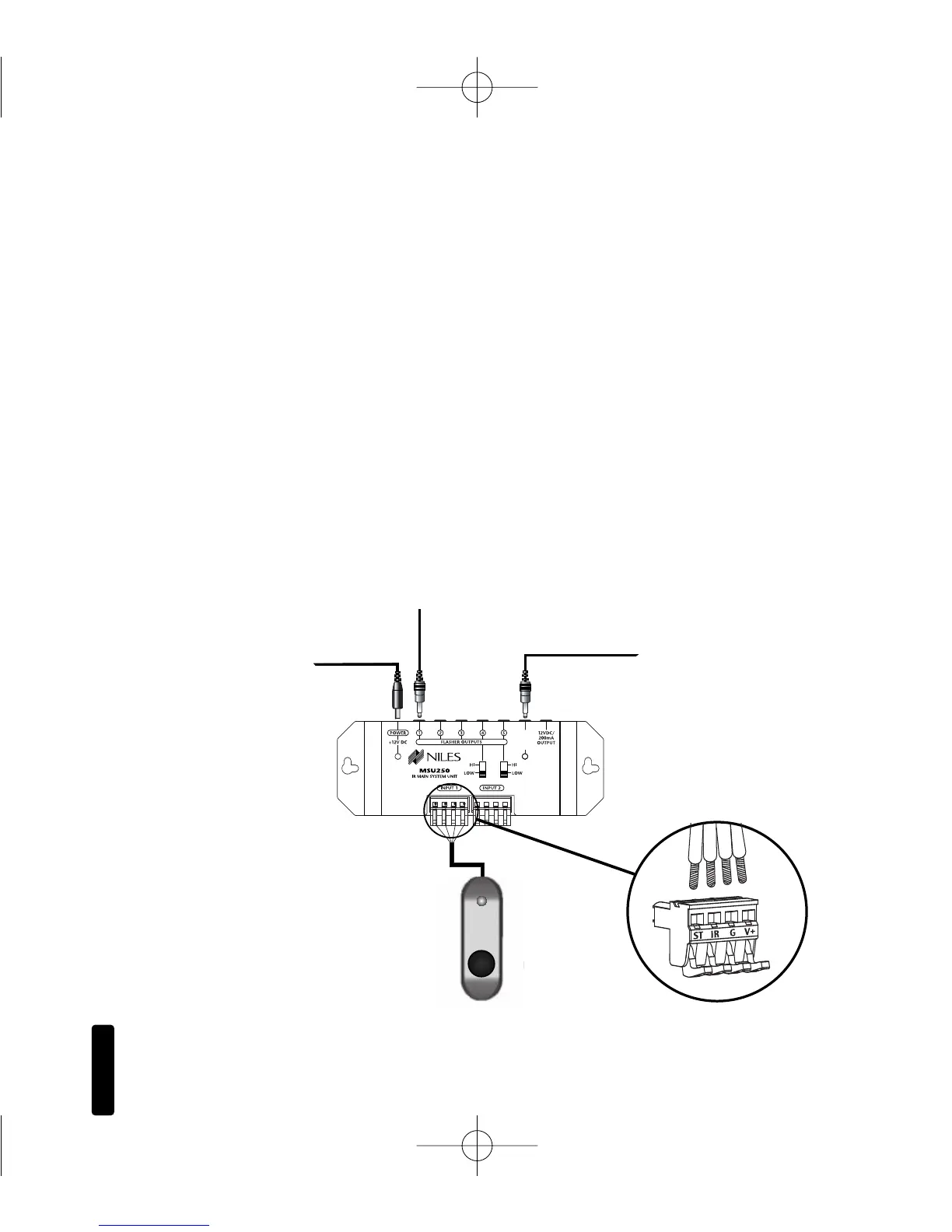
Insert each wire into the appropriate hole on the removable
connector plug (
Figure 2), and snap the locking tab down.
To help you, the connector plug is keyed. Insert the smooth
side of the connector plug into the smooth side of the socket.
Don’t force the scalloped side of the connector plug into the
smooth side of the socket.
Make sure that the orientation of the connector matches the
sensor (Figure 3).

3-30V
AC/DC
STATUS
IN
MS200 Sensor
T
o uns
witched
AC Outlet
Figure 2:
MSU250 Installation
MSU250 Sensor
C
onnection
MSU250
To Niles
IR Flasher
To 12VDC Power Supply
Plugged into a switched AC Outlet.
Typically found in back of a receiver.
Red = 12V+
Black = Ground
Yellow = Data
White = Status
DS00408ACN_RCA3 Kit.qxp 1/17/05 3:52 PM Page 5

Other manuals for Niles RCA3

Related product manuals