14
Select DOUBLE STACK PRO
• Place bottom layer of
food in basket.
• Insert the Stacked Meal Rack
and place the top layer of food
on top. (Repeat with second
basket if making two meals).
• Select DOUBLE STACK PRO*
Program Zone 2
• Repeat step 2 if making
two meals.
Set temp & time
• Select Zone 1 or 2.
• The cook temperature
defaults to 450°F. If
desired or instructed by
recipe, select the TEMP
button and use the arrows
to change the temperature.
• Select the TIME button
and use the arrows to
set the cook time.
Begin cooking
• Press the START/PAUSE
button to begin cooking.
• The zone with the shorter
cook time will display HOLD.
Step 1
Step 3 Step 4
Step 2
*For DOUBLE STACK PRO, SMART FINISH, or
MATCH COOK functionality, select SMART FINISH
or MATCH COOK prior to starting cooking.
DoubleStack
™
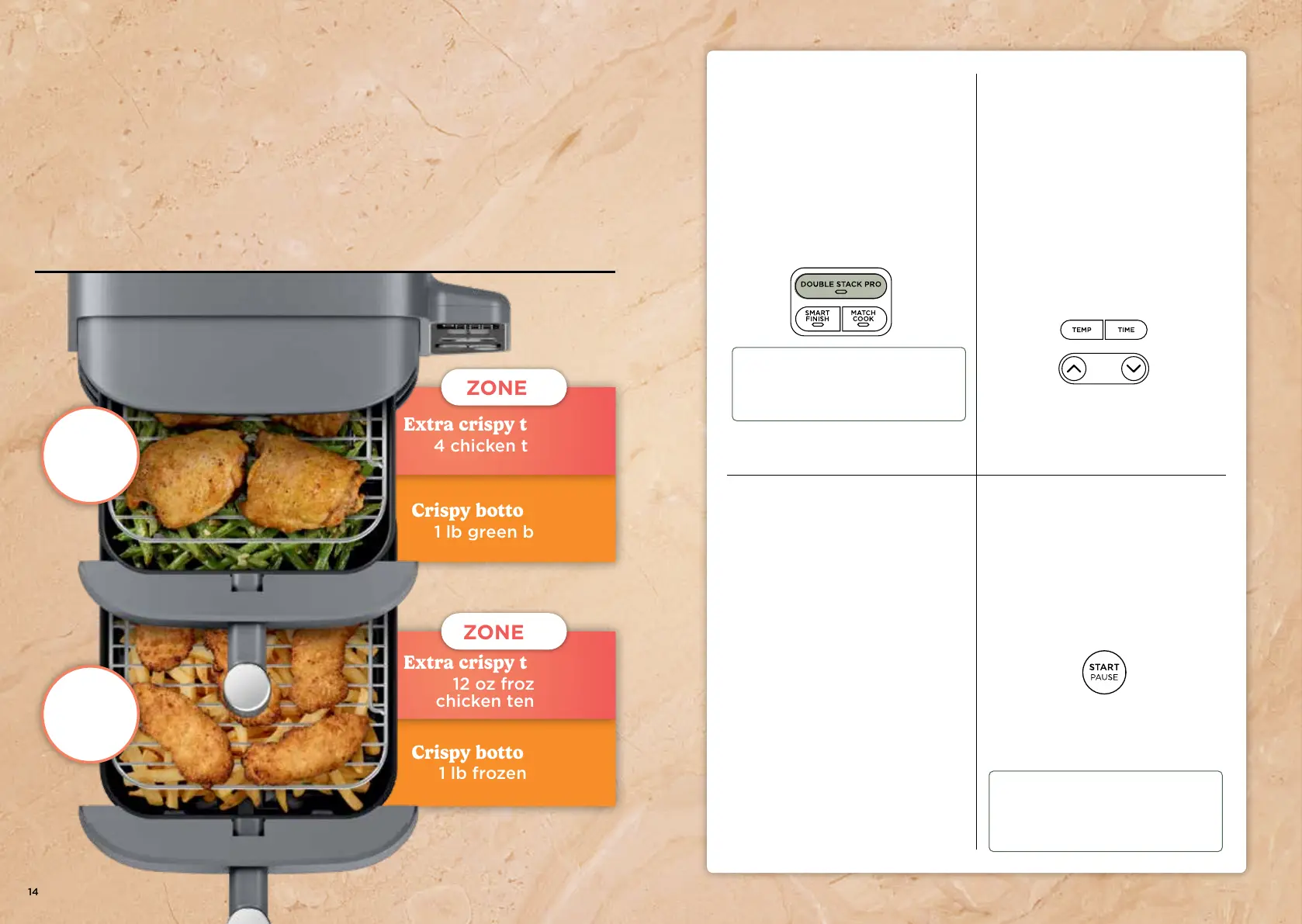
Cook 4 foods at once in
2 independent air fry baskets for
crispy meals and snacks.
Crispy bottom layer:
1 lb green beans
Crispy bottom layer:
1 lb frozen fries
ninjakitchen.com 15
NOTE: Use DOUBLE STACK PRO ONLY
in conjunction with the "Rack. Stack.
Repeat." meal builder on pages 16 and 17
or Stacked Meal recipes.
Extra crispy top layer:
12 oz frozen
chicken tenders
Extra crispy top layer:
4 chicken thighs
ZONE 1
ZONE 2
AIR FRY
450°F
35–40 MINS
AIR FRY
450°F
35–45 MINS
TIP: The Stacked Meal Racks will be hot
after cooking. Use oven mitts or
silicone-tipped tongs to remove them
from the baskets.




 To Next Page