35
Applications & Settings
36
Applications & Settings
Select a photo from your album and tap
.
Using the Camera (cont.)
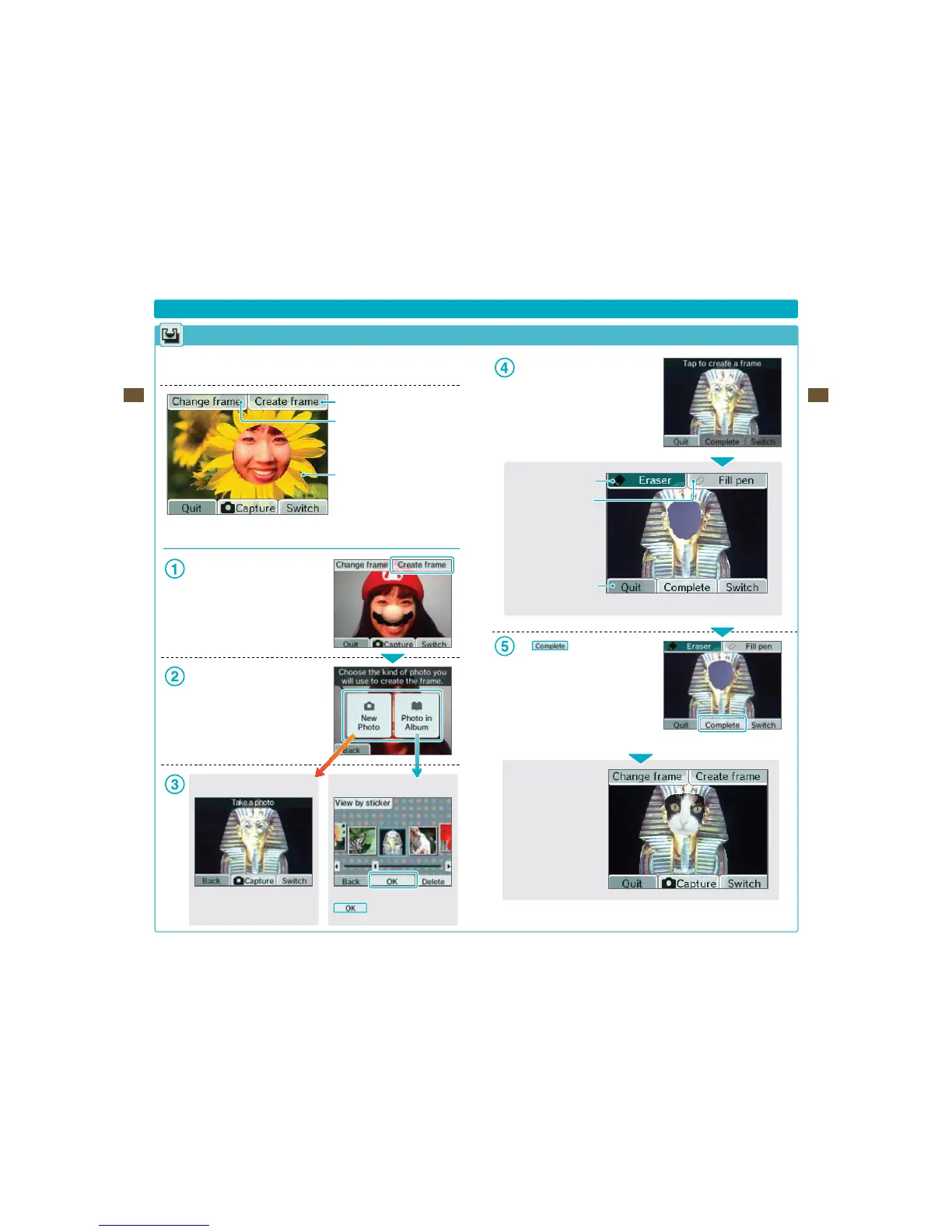
Frame Lens
Using this lens, you can capture photos within preset or user-created frames, or you can create your own
brand-new frames.
Create a new frame
Select a dierent frame
Current frame
Creating Frames
Tap Create frame on the Touch Screen.
Select whether to take a new photo to create
ZPVSGSBNFPSUPVTFBQIPUPZPVWFBMSFBEZ
taken.
New Photo
Take a new photo and use it to create a
frame.
Photo in Album
Use the eraser to carve out a blank area
in the photo.
Use eraser
Use ll pen
Return to the
previous screen
Tap
to save your frame.
The completed frame is saved as frame data.
:PVDBOOPXTFMFDUJUVTJOHChange frame.
4FFTUFQ
Now, use the frame you
just created and take a new
QJDUVSFXJUIJU















 To Next Page