EasyManua.ls Logo

Nintendo DSI - Adjusting System Settings; Volume, Brightness, and SD Card Use

Nintendo DSI
72 pages
Print Icon
To Next Page IconTo Next Page
To Previous Page IconTo Previous Page
Loading...
@
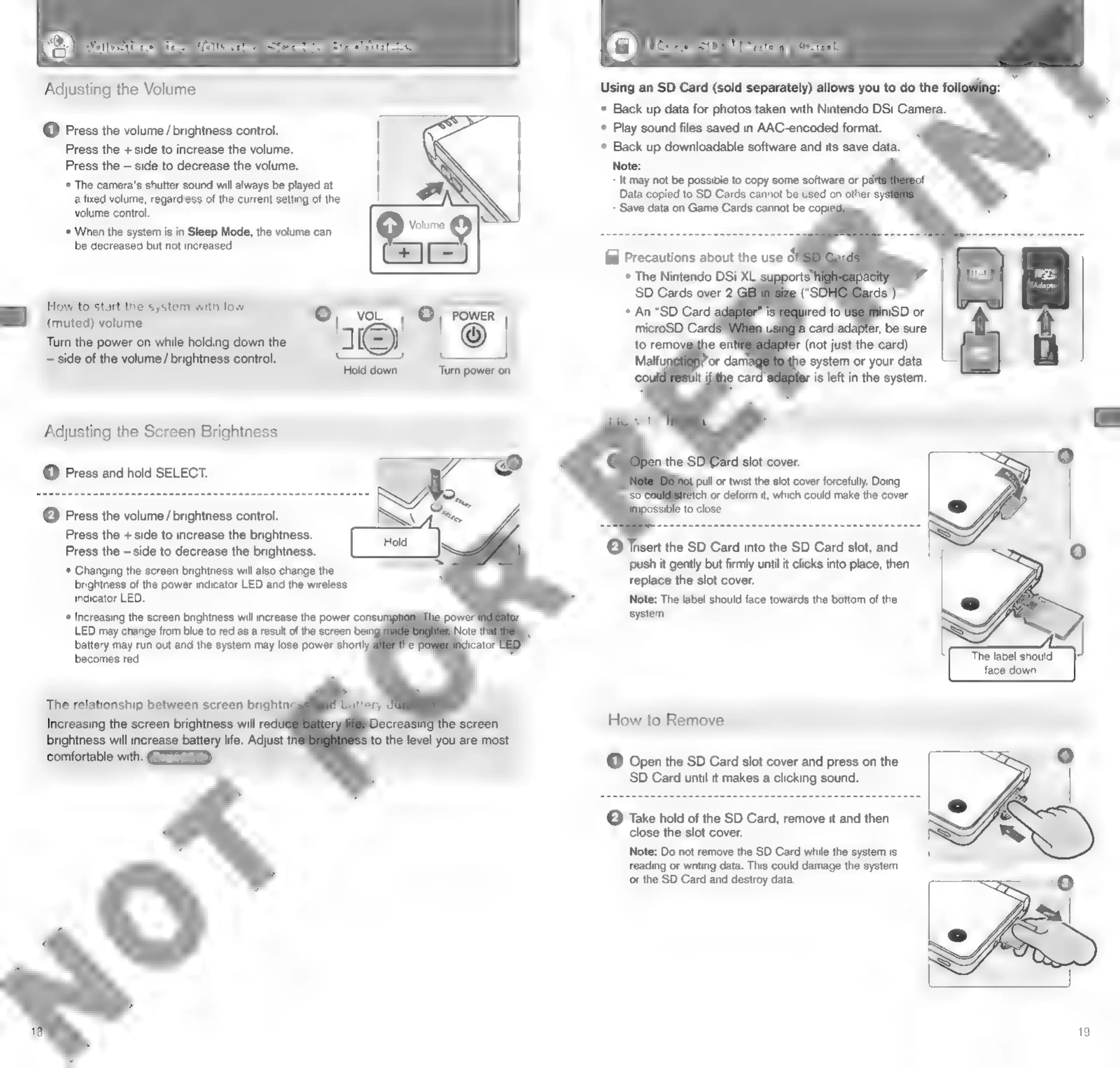
Adjusting
the
Volume
/
Screen
Brightness
©
Using
SD
Memory
Cards
Adjusting
the
Volume
Using
an
SD
Card
(sold
separately)
allows
you
to
do
the
foll
*
Back
up
data
for
photos
taken
with
Nintendo
DSi
Camera.
@
Press
the
volume
/
brightness
control.
*
Play
sound
files
saved
in
AAC-encoded
format.
Press
the
+
side
to
increase
the
volume.
*
Back
up
downloadable
software
and
its
save
data.
Press
the
side
to
decrease
the
volume.
Note:
*
The
camera's
shutter
sound
will
always
be
played
at
It
may
not
be
possible
to
copy
some
software
or
pal
a
fixed
volume,
regardless
of
the
current
setting
of
the
Data
copied
to
SD
Cards
cannot
be
used
on
other
sys
volume
control.
Save
data
on
Game
Cards
cannot
be
copi
*
When
the
system
is
in
Sleep
Mode,
the
volume
can
Velie
e
be
decreased
but
not
increased.
(ea)
=
fal
Precautions
about
the
use
o}
*
The
Nintendo
DSi
XL
mss
Adopter
How
to
start
the
system
with
low
o
4
ra
=I
vo..
|
@/
rower
(muted)
volume
Turn
the
power
on
while
holding
down
the
|
©
6
(not
just
the
card).
~
side
of
the
volume
/
brightness
control.
e
system
or
your
data
Eo
ane
sromni
paws)
on
is
left
in
the
system.
Adjusting
the
Screen
Brightness
@
Press
and
hold
SELECT.
ull
or
twist
the
slot
cover
forcefully,
Doing
ich
or
deform
it,
which
could
make
the
cover
(2)
Press
the
volume
/
brightness
control.
Press
the
+side
to
increase
the
brightness.
Press
the
—side
to
decrease
the
brightness.
*
Changing
the
screen
brightness
will
also
change
the
brightness
of
the
power
indicator
LED
and
the
wireless
indicator
LED.
*
Increasing
the
screen
brightness
will
increase
the
power
consump
LED
may
change
from
blue
to
red
as
a
result
of
the
screen
being
battery
may
run
out
and
the
system
may
lose
power
shortly:
becomes
red.
©
Insert
the
SD
Card
into
the
SD
Card
slot,
and
push
it
gently
but
firmly
until
it
clicks
into
place,
then
replace
the
slot
cover.
Note:
The
label
should
face
towards
the
bottom
of
the
system.
ne,
The
label
should
J
face
down.
The
relationship
between
screen
brightn
Increasing
the
screen
brightness
will
red
brightness
will
increase
battery
life.
Adjust
comfortable
with.
How
to
Remove
(1)
Open
the
SD
Card
slot
cover
and
press
on
the
SD
Card
until
it
makes
a
clicking
sound.
©
Take
hold
of
the
SD
Card,
remove
it
and
then
close
the
slot
cover.
Note:
Do
not
remove
the
SD
Card
while
the
system
is
reading
or
writing
data.
This
could
damage
the
system
or
the
SD
Card
and
destroy
data.

Other manuals for Nintendo DSI

Related product manuals